Die letzten sechs Beiträge:

Über mich

Wie viele ....

Random Post
Search
  • Home
  • Tag Archives:  Flow
Search
  • Control Proxon heat pump by Node-Red

    Proxon Air Conditioning & T300 Boiler Boost with PV Surplus Control in Node-RED

    In this post I describe how I integrated my Proxon ventilation heating and the T300 hot water tank into my IoT system. The goal is to make good use of the surplus power from my PV system:

    • Cooling with the air conditioning function of the Proxon, which I had retrofitted by the company Zimmermann.
    • Heating water with the boost function of the T300, which heats the water up to 55 °C.

    The project requires a few hardware and software components. They do not necessarily have to be the same ones I use – what matters is that they offer the same functions.

    Components used

    Hardware

    • Raspberry Pi 4B with 8 GB RAM
    • USB-to-RS485 adapter for reading and writing via Modbus (any suitable adapter will do)
    • Shelly Plus 1 with a potential-free switching output for the boost function of the T300

    And of course …

    • PV system with battery whose values (including the state of charge/SOC) can be read via MQTT – in my case an E3/DC home power station
    • Proxon FWT 2.0 ventilation heating with air conditioning function
    • Proxon T300 hot water tank, matching the Proxon

    Software

    • Node-RED
    • Mosquitto MQTT broker
    • Node-RED palettes:
      • node-red-contrib-modbus
      • node-red-contrib-pushover
      • @flowfuse/node-red-dashboard
    • Optional: a Pushover account for push notifications

    Setup

    The entire project runs on the Raspberry Pi 4B. It runs the current Node-RED version 5.0.8 as well as the Mosquitto MQTT broker for data exchange via MQTT.

    • Modbus connection to the Proxon: The USB-to-RS485 adapter is connected to the Raspberry Pi via USB and to terminal X6 on the Proxon control board.
    • Boost function of the T300: The switching output of the Shelly Plus 1 is connected to terminal X13 on the T300 board. This allows the boost to be switched on and off as needed.

    You can find more about controlling the T300 in my post Node-RED Control Proxon T300, E3DC, Shelly.

    Using free solar power for cooling and hot water: My Node-RED flow automatically switches the cooling function of my Proxon ventilation heating and the Boiler Boost of the T300 hot water tank – but only when the PV system delivers enough power, the home battery is sufficiently charged and (for cooling) it is actually warm outside.

    The values come from the E3/DC home power station via MQTT and directly from the Proxon via Modbus RTU (RS485). Every switching action is reported via Pushover, and in the Node-RED Dashboard 2.0 I can see all values and conveniently adjust the thresholds with sliders.

    Important for the Proxon: The Modbus interface uses 19200 baud, 8 data bits, parity even, 1 stop bit. With parity none you will not get any response.

    Features

    PV-controlled cooling (air conditioning)

    • Switches on only if outside temperature > threshold AND battery level ≥ threshold AND PV power > threshold.
    • The operating mode (holding register 16) and the cooling release (holding register 62) are written to the Proxon via Modbus.
    • The outside temperature comes from the Proxon's own T3 fresh air sensor (input register 198).
    • As long as no temperature value is available, cooling stays off for safety.
    • After cooling, the unit is intentionally switched off completely (operating mode 0).

    PV-controlled Boiler Boost (T300)

    • The Shelly Plus 1 is switched via MQTT when battery level ≥ threshold AND PV power ≥ threshold – so hot water is produced with free electricity only.

    Hysteresis – protecting the compressor

    • Cooling: at least 15 minutes on, at least 10 minutes off.
    • Boiler Boost: at least 10 minutes on, at least 10 minutes off.

    Notifications and dashboard

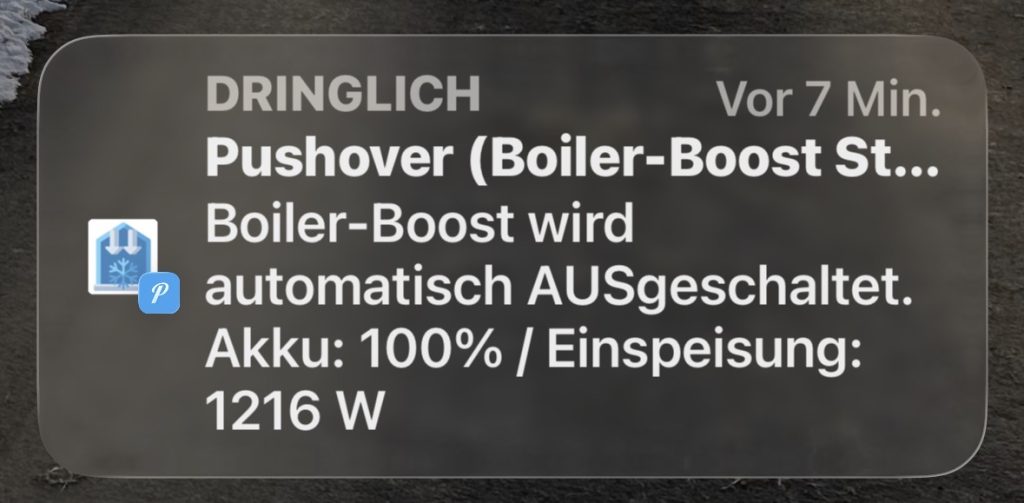
    • Pushover message on every automatic switch-on and switch-off, including the current values and thresholds.
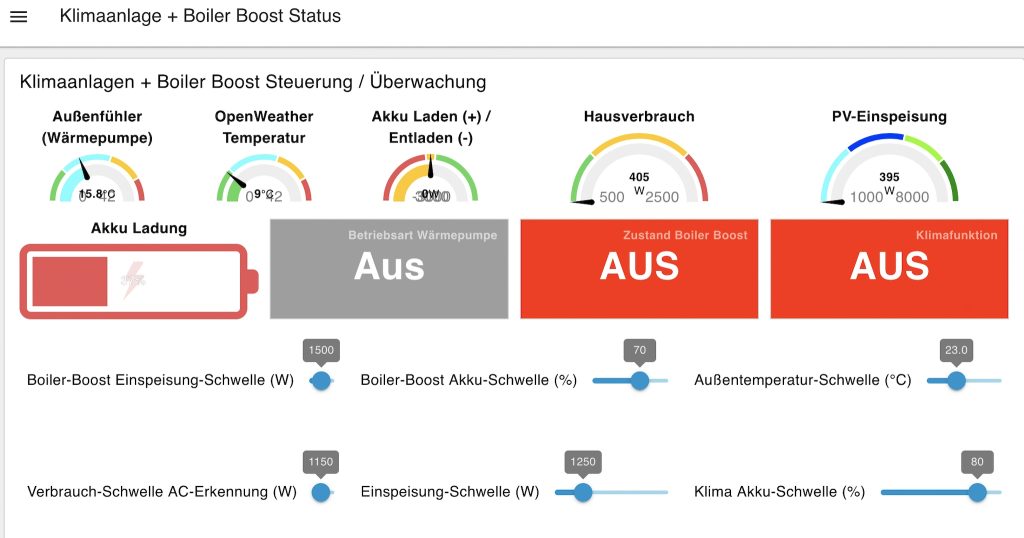
    • Dashboard 2.0 with gauges for outside temperature, PV power, house consumption and battery level.
    • Status tiles for the heat pump operating mode (Off / Summer / Winter / ECO), the cooling function and the Boiler Boost.
    • Sliders for all thresholds. The settings are restored automatically when the dashboard is reopened.
    • A generic Modbus decoder with the complete register list of the Proxon (unit 41) and the T300 (unit 20) – easy to extend with your own values.
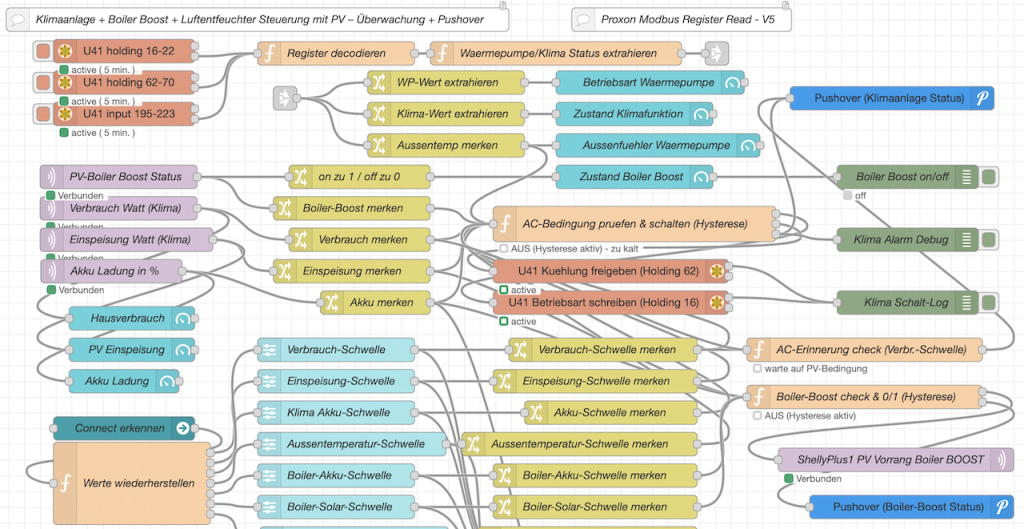
    Node-RED flow air conditioning and Boiler Boost
    Overview of the Node-RED flow
    Node-RED Dashboard 2.0 air conditioning and Boiler Boost
    The dashboard with values, status and sliders

    Data sources

    MQTT topics (E3/DC and Shelly)

    TopicContentUsed for
    Haus/Keller/e3dc/solar/powerPV power in WCondition for cooling + Boiler Boost
    Haus/Keller/e3dc/battery/socBattery level in %Condition for cooling + Boiler Boost
    Haus/Keller/e3dc/home/powerHouse consumption in WDashboard display
    Haus/Keller/Shelly/PVBoiler/command/switch:0on / off (retained)Switching + status of Boiler Boost

    Proxon Modbus registers (unit 41)

    RegisterTypeMeaningAccess
    16HoldingOperating mode: 0 = Off, 1 = Summer, 2 = Winter, 3 = ECOread / write
    62HoldingCooling release: 0 = Off, 1 = Onread / write
    198InputT3 fresh air (= outside temperature), value in 1/100 °Cread

    The function node Register decodieren contains the complete register list with name, scaling, offset, unit and sign for unit 41 and unit 20. Polling is done in three blocks (holding 16–22, holding 62–70, input 195–223) every 5 minutes.

    How the flow works

    1. Polling and decoding Modbus: The Proxon registers are read and converted using the register list, and the operating mode, cooling state and outside temperature are extracted.
    2. Collecting values: PV power, battery level, outside temperature and all slider values are stored in the flow context.
    3. Controlling the cooling: The conditions are checked on every new value. If necessary, registers 16 and 62 are written via Modbus and a Pushover message is sent.
    4. Controlling the Boiler Boost: The battery and PV thresholds are checked, the Shelly is switched via MQTT and a Pushover message is sent.
    [modbus-read U41 holding 16-22 / 62-70 / input 195-223]  (every 5 min)
        │
        ▼
    [Register decodieren] ──► [Extract heat pump / cooling status]
                                       │
                                       ├──► [Dashboard: operating mode, cooling, outside temp.]
                                       └──► (outside temperature → flow context)
    
    [MQTT E3/DC: PV power, battery SOC, house consumption]
    [Dashboard sliders: thresholds] ──► (flow context + global cache)
        │
        ├──► [Cooling check & switch (hysteresis 15/10 min)]
        │         ├──► [modbus-write U41 holding 16: operating mode]
        │         ├──► [modbus-write U41 holding 62: cooling release]
        │         └──► [Pushover]
        │
        └──► [Boiler Boost check & switch (hysteresis 10/10 min)]
                  ├──► [MQTT → Shelly Plus 1 (T300 Boiler Boost)]
                  └──► [Pushover]
    
    [ui-control: dashboard connected] ──► [Restore slider values]

    Importing and setting up the flow

    You can find the complete flow in my GitHub repository in the file Klimaanlage-BoilerBoost-PV-Flow.json. Simply copy the JSON and paste it into Node-RED via Menu → Import.

    Before the first start, the following points must be adapted to your own environment:

    1. Modbus client

    • Open the configuration node Proxon Modbus USBtoRS485.
    • Enter the serial port of your RS485 adapter (e.g. /dev/ttyUSB0) and check: 19200 baud, 8 data bits, parity even, 1 stop bit, RTU-BUFFERED.
    • Unit IDs: 41 for the ventilation heating, 20 for the T300.

    2. MQTT

    • Enter the address of your own broker in the configuration node mqtt-broker.
    • Adapt the topics in the mqtt in nodes (Verbrauch Watt, Einspeisung Watt, Akku Ladung in %, PV-Boiler Boost Status).
    • In the function node Boiler-Boost pruefen & schalten (Hysterese), adapt the Shelly topic in the line msgShelly = { topic: ... }.

    3. Pushover

    • Open one of the pushover api nodes and create the pushover-keys configuration with your own application key and user key.
    Pushover message air conditioning and Boiler Boost
    Pushover message when the Boiler Boost switches off automatically

    4. Thresholds in the dashboard

    SliderDefaultRange
    Cooling – battery threshold (%)900 – 100
    Cooling – PV power (W)12000 – 5000
    Cooling – outside temperature (°C)2515 – 35
    Boiler Boost – battery threshold (%)5020 – 100
    Boiler Boost – PV power (W)800150 – 3000

    The default values apply until a slider is moved for the first time.

    5. Optional customizing

    • Hysteresis: Change MIN_EIN_MS (minimum on-time) and MIN_AUS_MS (minimum off-time) in the two function nodes.
    • Polling interval: Change the rate in the three modbus-read nodes (currently 5 minutes).
    • Additional values: Every register from the list is available in the output of Register decodieren as u<unit>_<holding|input>_<address>.

    Troubleshooting

    • No Modbus response / timeouts: Check the parity (even!), the baud rate, the A/B wiring of the RS485 bus and the name of the serial port.
    • Cooling never switches on: The outside temperature must be known. Check that input register 198 is being read and look at the status text of the function node (Temp. unbekannt = temperature unknown / zu kalt = too cold).
    • Switching seems delayed: That is the hysteresis. During the minimum on-time or off-time, the node shows (Hysterese aktiv).
    • Slider values lost after a restart: The thresholds are stored in the global context. To keep them across a Node-RED restart, configure a persistent contextStorage (e.g. localfilesystem) in settings.js.

    Outlook

    As the next extension for the cold season, I would like to control the heating function of the Proxon via Modbus as well. It should only switch on when outside temperature < threshold AND battery level ≥ threshold AND PV power > threshold – and switch off again when the values drop below the thresholds.

    Download

    The flow, the documentation (English and German) and the pictures are available in my GitHub repository. I am always happy about feedback, ideas and exchange – especially on energy management, PV, heat pumps and Node-RED.

  • Heimann Rauchmelder Titelbild

    Heiman HS1SA-E Rauchmelder mit ZigBee2MQTT in Node-Red

    Meine bisheringen Rauchmelder arbeiten alle Standalone, die sind zwar recht laut wenn ein Alarm gemeldet wird, aber nicht vernetzbar, so dass immer nur der Melder in dem Raum einen Alarm ausgibt wo Rauch erkannt wird.

    Da ich ein IoT Smarthome System einsetze lag es nahe vernetzbare Rauchmelder einzusetzen. Nach einer ausfürlichen Suche bin ich auf die “Heimann HS1SA-E Rauchmelder mit ZigBee2MQTT” aufmerksam geworden und habe mir einige davon beschafft. Es gibt da verschiedene Typen, die einen haben ZigBee, andere nicht wichtig: HS1SA-E der kann ZigBee. Nach meiner Recherche ist wohl gerade ein Nachfolgemodell in Entwicklung, das auch einen Testalarm per ZigBee unterstützt, was das Modell HS1SA-E nicht kann!

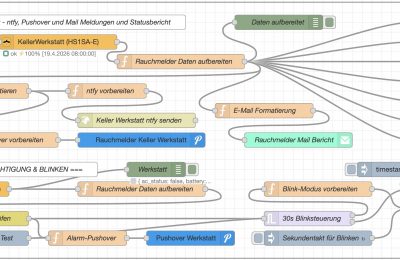
    Meine Intergartion basiert auf Node-Red mit ZigBee2MQTT (die Voraussetzungen siehe weiter unten), ich habe mir dazu Schritt für Schritt einen Flow erstellt, der den Zustand der Rauchmelder erfasst und Berichte per Mail, ntfy und Pushover verschickt. Falls es einen Alarm gibt habe ich eine ZigBee Kerzenbirne in zentraler Lage eingebunden, die dann blinkt. Mit einer aktustische Meldung muss ich mir noch überlegen wie das inntegriert werden könnte.

    Die Rauchmelder sind etwas zickig bei der Integration in ZB2M, wenn man ein Interview startet muss man am Besten alle zwei drei Sekunden den Reset Knopf kurz drücken, damit sie nicht sofort wieder in den Schlafmodus gehen. Musste das mehrmals machen, damit die Daten sauber ausgelesen werden konnten, seit dem ist es ok.

    Das Ganze ist natürlich noch V 0.8, also da gibt es noch Potential für Verbesserungen, wer will kann sich ja mal mit dem Status Quo versuchen und mir Rückmeldung geben für Verbesserungen, Korrekturen oder was auch immer. Schon mal viel Sapß damit.

    Gruß

    Edi

    Eine Beschreibung des Heimann Rauchmelders:
    HEIMAN Zigbee Rauchmelder

    Der HEIMAN Zigbee Rauchmelder besitzt eine genaue Raucherkennung und Sie werden akustisch und visuell alarmiert. In einer ernsten Situation alarmiert der Rauchsensor mit einer roten LED, die schnell und mit einem lauten Alarm blinkt. Darüber hinaus besteht die Möglichkeit, eine Warnung auf Ihrem Smartphone zu erhalten, wenn Sie nicht zu Hause sind. So wird verhindert, dass ein Brand durch Rauch entsteht und teure Folgeschäden verursacht werden.
    Durch den Einsatz der Funktechnologie Zigbee 3.0 kann der Sensor an jedes Zigbee-Gateway angeschlossen werden. Dank des neuesten Zigbee 3.0 Standards gewährleistet der Rauchsensor eine Batterielebensdauer von 3 Jahren.
    Eigenschaften:

    Erkennt Rauch und sichtbare Partikel, welche durch einen Schwelbrand entstehen
    Benachrichtigung über Feueralarm, auch unterwegs
    Lautstärke des Alarms: 85 dB/3m
    Anzeige des Batteriestandes
    Batterie notwendig: Ja (1x Batterie CR123A)
    Lebensdauer der Batterie: 3 Jahre
    Funktechnologie: Zigbee 3.0
    Rauchmelder entspricht DIN EN14604 Norm

    Voraussetzung für den gesamten Ablauf:
    • Raspberrypi
    • MQTT Broker
    • ZigBee2mQTT mit Sonoff Dongle oder Ähnlichem
      • Heimann Rauchmelder
        • ZigBee Kerzenbirne oder was sonst zum Alarmieren verwendet wird
    • Node-Red mit Dashboard 2.0 und diversen anderen Paletten
    • ntfy Account
    • Pushover Account
    •  Mailaccount
      • für die Zustellung der Meldungen werden ntfy, Pushover und Mail verwendet
    Der komplette Node-Red Flow für die Rauchmelder Integration:
    [
    {
    “id”: “f19c1232b5818c2a”,
    “type”: “group”,
    “z”: “a906f7d4665bf705”,
    “style”: {
    “stroke”: “#999999”,
    “stroke-opacity”: “1”,
    “fill”: “none”,
    “fill-opacity”: “1”,
    “label”: true,
    “label-position”: “nw”,
    “color”: “#a4a4a4”
    },
    “nodes”: [
    “a6ea58dab388b29c”,
    “765bf0769705a2ff”,
    “g7h8i9j0k1l2m3n4”,
    “i9j0k1l2m3n4o5p6”,
    “fac5633b6eba8601”,
    “7a1904f924795633”,
    “1fc2a6b8f60b088d”,
    “f8b1b27956f09b3e”,
    “147944ef03bfde4c”,
    “4ab2f6e25855efce”,
    “9d6eebcf795ee86e”,
    “ac1607f8f0db6b5d”,
    “24495c060d2a8756”,
    “2bb5b7ad91154a04”,
    “06fda76032ceaefb”,
    “296a847a7c85c981”,
    “3deb8b862d1238e4”,
    “acbb6ccfa4615f05”,
    “2cf42ba58b153108”,
    “0f916dab840c7276”,
    “fd8f8ffdf77a106c”,
    “0469b6708a6631f2”,
    “e45e871a10a710b2”,
    “95efe3c5faf4ab5b”,
    “6f243fcb4da873d4”,
    “b69dfaa826fb2d91”,
    “685b6cb6ac3300e8”,
    “efd4d502334fbc36”,
    “6247c2a58286fc73”,
    “ab3764d33b337c6f”,
    “0f3d4c079b703181”,
    “cb8dcc5798bb85a4”,
    “551b4d13bc9b505f”,
    “191ef45fc6c07a97”,
    “d4e9451a20607f2f”
    ],
    “x”: 34,
    “y”: 19,
    “w”: 1312,
    “h”: 522
    },
    {
    “id”: “a6ea58dab388b29c”,
    “type”: “zigbee2mqtt-get”,
    “z”: “a906f7d4665bf705”,
    “g”: “f19c1232b5818c2a”,
    “name”: “”,
    “server”: “1bfcccb11dd30d19”,
    “friendly_name”: “KellerWerkstatt (HS1SA-E)”,
    “device_id”: “0xf84477fffe123ed0”,
    “state”: “0”,
    “enableMultiple”: false,
    “x”: 400,
    “y”: 100,
    “wires”: [
    [
    “06fda76032ceaefb”
    ]
    ]
    },
    {
    “id”: “765bf0769705a2ff”,
    “type”: “inject”,
    “z”: “a906f7d4665bf705”,
    “g”: “f19c1232b5818c2a”,
    “name”: “8:00 Tag”,
    “props”: [
    {
    “p”: “topic”,
    “vt”: “str”
    }
    ],
    “repeat”: “”,
    “crontab”: “00 08 * * *”,
    “once”: false,
    “onceDelay”: 0.1,
    “topic”: “”,
    “x”: 140,
    “y”: 140,
    “wires”: [
    [
    “a6ea58dab388b29c”
    ]
    ]
    },
    {
    “id”: “g7h8i9j0k1l2m3n4”,
    “type”: “function”,
    “z”: “a906f7d4665bf705”,
    “g”: “f19c1232b5818c2a”,
    “name”: “E-Mail Formatierung”,
    “func”: “let data = msg.payload;\n\n// E-Mail Inhalt erstellen\nlet emailContent = `\n<h2>🏠 🚨 Rauchmelder Statusbericht</h2>\n<p><strong>Gerät:</strong> ${data.friendly_name}</p>\n<p><strong>Datum/Uhrzeit:</strong> ${new Date(data.timestamp).toLocaleString(‘de-DE’)}</p>\n<hr>\n<h3>Status:</h3>\n<table border=\”1\” cellpadding=\”5\” cellspacing=\”0\” style=\”border-collapse: collapse;\”>\n <tr>\n <td><strong>Batteriestatus:</strong></td>\n <td>${data.battery}%</td>\n </tr>\n <tr>\n <td><strong>Batterie OK:</strong></td>\n <td>${data.battery_ok ? ‘✅ Ja’ : ‘❌ Nein – Bitte wechseln!’}</td>\n </tr>\n <tr>\n <td><strong>Test-Modus:</strong></td>\n <td>${data.test_mode ? ‘🔴 Aktiv’ : ‘⚪ Inaktiv’}</td>\n </tr>\n <tr>\n <td><strong>Rauchmelder:</strong></td>\n <td>${data.smoke ? ‘🚨 ALARM’ : ‘✅ Normal’}</td>\n </tr>\n <tr>\n <td><strong>Signalstärke:</strong></td>\n <td>${data.linkquality} LQI</td>\n </tr>\n</table>\n\n<p><em>Automatisierte Statusmeldung ZigBee Rauchmelder ${data.friendly_name}.</em></p>\n`;\n\n// Warnung bei niedrigem Batteriestand\nif (!data.battery_ok) {\n emailContent = emailContent.replace(‘<h2>’, ‘<h2 style=\”color: red;\”>⚠️ WARNUNG – ‘);\n emailContent += ‘<p style=\”color: red; font-weight: bold;\”>⚠️ Der Batteriestand ist niedrig! Bitte tauschen Sie die Batterie aus.</p>’;\n}\n\nmsg.payload = emailContent;\nmsg.topic = `Rauchmelder ${data.friendly_name} Statusbericht`;\n\nreturn msg;”,
    “outputs”: 1,
    “timeout”: “”,
    “noerr”: 0,
    “initialize”: “”,
    “finalize”: “”,
    “libs”: [],
    “x”: 820,
    “y”: 240,
    “wires”: [
    [
    “fac5633b6eba8601”
    ]
    ]
    },
    {
    “id”: “i9j0k1l2m3n4o5p6”,
    “type”: “inject”,
    “z”: “a906f7d4665bf705”,
    “g”: “f19c1232b5818c2a”,
    “name”: “Manueller Test”,
    “props”: [
    {
    “p”: “payload”
    },
    {
    “p”: “topic”,
    “vt”: “str”
    }
    ],
    “repeat”: “”,
    “crontab”: “”,
    “once”: false,
    “onceDelay”: 0.1,
    “topic”: “”,
    “payload”: “”,
    “payloadType”: “date”,
    “x”: 160,
    “y”: 100,
    “wires”: [
    [
    “a6ea58dab388b29c”
    ]
    ]
    },
    {
    “id”: “fac5633b6eba8601”,
    “type”: “e-mail”,
    “z”: “a906f7d4665bf705”,
    “g”: “f19c1232b5818c2a”,
    “server”: “smtp.mail.de”,
    “port”: “465”,
    “secure”: true,
    “tls”: true,
    “name”: “rauchmelder@domain.com”,
    “dname”: “Rauchmelder Mail Bericht”,
    “output”: false,
    “outputs”: 0,
    “x”: 890,
    “y”: 300,
    “wires”: []
    },
    {
    “id”: “7a1904f924795633”,
    “type”: “debug”,
    “z”: “a906f7d4665bf705”,
    “g”: “f19c1232b5818c2a”,
    “name”: “Daten aufbereitet”,
    “active”: true,
    “tosidebar”: true,
    “console”: false,
    “tostatus”: false,
    “complete”: “payload”,
    “targetType”: “msg”,
    “statusVal”: “”,
    “statusType”: “auto”,
    “x”: 850,
    “y”: 60,
    “wires”: []
    },
    {
    “id”: “1fc2a6b8f60b088d”,
    “type”: “ui-gauge”,
    “z”: “a906f7d4665bf705”,
    “g”: “f19c1232b5818c2a”,
    “name”: “Rauchmelder Batterie”,
    “group”: “5673b51cc6b259c0”,
    “order”: 1,
    “value”: “payload.battery”,
    “valueType”: “msg”,
    “width”: 3,
    “height”: 3,
    “gtype”: “gauge-half”,
    “gstyle”: “needle”,
    “title”: “Batterie”,
    “alwaysShowTitle”: false,
    “units”: “%”,
    “icon”: “”,
    “prefix”: “”,
    “suffix”: “”,
    “segments”: [
    {
    “from”: “0”,
    “color”: “#ff2600”,
    “text”: “”,
    “textType”: “label”
    },
    {
    “from”: “40”,
    “color”: “#ffc800”,
    “text”: “”,
    “textType”: “label”
    },
    {
    “from”: “100”,
    “color”: “#4e8f00”,
    “text”: “”,
    “textType”: “label”
    }
    ],
    “min”: 0,
    “max”: 100,
    “sizeThickness”: 16,
    “sizeGap”: 4,
    “sizeKeyThickness”: 8,
    “styleRounded”: true,
    “styleGlow”: false,
    “className”: “”,
    “x”: 1220,
    “y”: 60,
    “wires”: [
    []
    ]
    },
    {
    “id”: “f8b1b27956f09b3e”,
    “type”: “ui-text”,
    “z”: “a906f7d4665bf705”,
    “g”: “f19c1232b5818c2a”,
    “group”: “5673b51cc6b259c0”,
    “order”: 7,
    “width”: “3”,
    “height”: 1,
    “name”: “Batterie Anzeige”,
    “label”: “Batteriestatus”,
    “format”: “{{msg.payload.battery}}%”,
    “layout”: “row-spread”,
    “style”: false,
    “font”: “”,
    “fontSize”: “”,
    “color”: “#000000”,
    “wrapText”: false,
    “className”: “”,
    “value”: “payload.battery”,
    “valueType”: “msg”,
    “x”: 1200,
    “y”: 100,
    “wires”: []
    },
    {
    “id”: “147944ef03bfde4c”,
    “type”: “ui-text”,
    “z”: “a906f7d4665bf705”,
    “g”: “f19c1232b5818c2a”,
    “group”: “5673b51cc6b259c0”,
    “order”: 6,
    “width”: “3”,
    “height”: 1,
    “name”: “Batterie OK Status”,
    “label”: “Batterie OK”,
    “format”: “{{msg.payload.battery_ok ? ‘✅ Ja’ : ‘❌ Nein’}}”,
    “layout”: “row-spread”,
    “style”: false,
    “font”: “”,
    “fontSize”: “”,
    “color”: “#000000”,
    “wrapText”: false,
    “className”: “”,
    “value”: “payload.battery_ok”,
    “valueType”: “msg”,
    “x”: 1210,
    “y”: 140,
    “wires”: []
    },
    {
    “id”: “4ab2f6e25855efce”,
    “type”: “ui-text”,
    “z”: “a906f7d4665bf705”,
    “g”: “f19c1232b5818c2a”,
    “group”: “5673b51cc6b259c0”,
    “order”: 5,
    “width”: “3”,
    “height”: 1,
    “name”: “Test Modus”,
    “label”: “Test-Modus”,
    “format”: “{{msg.payload.test_mode ? ‘🔴 Aktiv’ : ‘⚪ Inaktiv’}}”,
    “layout”: “row-spread”,
    “style”: false,
    “font”: “”,
    “fontSize”: “”,
    “color”: “#000000”,
    “wrapText”: false,
    “className”: “”,
    “value”: “payload.test_mode”,
    “valueType”: “msg”,
    “x”: 1190,
    “y”: 180,
    “wires”: []
    },
    {
    “id”: “9d6eebcf795ee86e”,
    “type”: “ui-text”,
    “z”: “a906f7d4665bf705”,
    “g”: “f19c1232b5818c2a”,
    “group”: “5673b51cc6b259c0”,
    “order”: 4,
    “width”: “3”,
    “height”: 1,
    “name”: “Rauch Status”,
    “label”: “Rauchmelder”,
    “format”: “{{msg.payload.smoke ? ‘🚨 ALARM’ : ‘✅ Normal’}}”,
    “layout”: “row-spread”,
    “style”: false,
    “font”: “”,
    “fontSize”: “”,
    “color”: “#000000”,
    “wrapText”: false,
    “className”: “”,
    “value”: “payload.smoke”,
    “valueType”: “msg”,
    “x”: 1200,
    “y”: 220,
    “wires”: []
    },
    {
    “id”: “ac1607f8f0db6b5d”,
    “type”: “ui-text”,
    “z”: “a906f7d4665bf705”,
    “g”: “f19c1232b5818c2a”,
    “group”: “5673b51cc6b259c0”,
    “order”: 3,
    “width”: “3”,
    “height”: 1,
    “name”: “Signalstärke”,
    “label”: “Signalstärke”,
    “format”: “{{msg.payload.linkquality}} LQI”,
    “layout”: “row-spread”,
    “style”: false,
    “font”: “”,
    “fontSize”: “”,
    “color”: “#000000”,
    “wrapText”: false,
    “className”: “”,
    “value”: “payload.linkquality”,
    “valueType”: “msg”,
    “x”: 1190,
    “y”: 260,
    “wires”: []
    },
    {
    “id”: “24495c060d2a8756”,
    “type”: “ui-text”,
    “z”: “a906f7d4665bf705”,
    “g”: “f19c1232b5818c2a”,
    “group”: “5673b51cc6b259c0”,
    “order”: 2,
    “width”: “3”,
    “height”: 1,
    “name”: “Letztes Update”,
    “label”: “Letztes Update”,
    “format”: “{{msg.payload.timestamp | date:’DD.MM.YYYY HH:mm:ss’}}”,
    “layout”: “row-spread”,
    “style”: false,
    “font”: “”,
    “fontSize”: “”,
    “color”: “#000000”,
    “wrapText”: false,
    “className”: “”,
    “value”: “payload.timestamp_formatted”,
    “valueType”: “msg”,
    “x”: 1200,
    “y”: 300,
    “wires”: []
    },
    {
    “id”: “2bb5b7ad91154a04”,
    “type”: “comment”,
    “z”: “a906f7d4665bf705”,
    “g”: “f19c1232b5818c2a”,
    “name”: “Rauchmelder Keller Werkstatt – ntfy, Pushover und Mail Meldungen und Statusbericht”,
    “info”: “”,
    “x”: 360,
    “y”: 60,
    “wires”: []
    },
    {
    “id”: “06fda76032ceaefb”,
    “type”: “function”,
    “z”: “a906f7d4665bf705”,
    “g”: “f19c1232b5818c2a”,
    “name”: “Rauchmelder Daten aufbereiten”,
    “func”: “// ZigBee2MQTT Daten parsen\nlet data = msg.payload;\nlet deviceInfo = {};\n\n// Prüfen ob Daten vorhanden sind\nif (typeof data === ‘object’) {\n // Batteriestatus (in % oder Spannung)\n deviceInfo.battery = data.battery || data.battery_percentage || 0;\n deviceInfo.battery_low = data.battery_low || false;\n \n // Test-Modus (falls vorhanden)\n deviceInfo.test_mode = data.test_mode || false;\n \n // Rauchmelder Status (Alarm, Normal, etc.)\n deviceInfo.smoke = data.smoke || false;\n deviceInfo.smoke_detected = data.smoke_detected || false;\n \n // Zusätzliche Status-Felder für HS1SA-E\n deviceInfo.trouble = data.trouble || false;\n deviceInfo.tamper = data.tamper || false;\n \n // Link Quality\n deviceInfo.linkquality = data.linkquality || 0;\n \n // Last seen aus ZigBee2MQTT\n deviceInfo.last_seen = data.last_seen || new Date().toISOString();\n \n // Batterie OK Status berechnen\n deviceInfo.battery_ok = true;\n if (deviceInfo.battery_low === true || \n (typeof deviceInfo.battery === ‘number’ && deviceInfo.battery < 20)) {\n deviceInfo.battery_ok = false;\n }\n \n // Timestamp für die aktuelle Abfrage\n deviceInfo.timestamp = new Date().toISOString();\n deviceInfo.timestamp_formatted = new Date().toLocaleString(‘de-DE’);\n \n deviceInfo.friendly_name = \”KellerWerkstatt\”;\n \n msg.payload = deviceInfo;\n \n return msg;\n}\n\nreturn msg;”,
    “outputs”: 1,
    “timeout”: 0,
    “noerr”: 0,
    “initialize”: “”,
    “finalize”: “”,
    “libs”: [],
    “x”: 650,
    “y”: 140,
    “wires”: [
    [
    “3deb8b862d1238e4”,
    “1fc2a6b8f60b088d”,
    “f8b1b27956f09b3e”,
    “147944ef03bfde4c”,
    “4ab2f6e25855efce”,
    “9d6eebcf795ee86e”,
    “ac1607f8f0db6b5d”,
    “24495c060d2a8756”,
    “7a1904f924795633”,
    “g7h8i9j0k1l2m3n4”
    ]
    ]
    },
    {
    “id”: “296a847a7c85c981”,
    “type”: “pushover api”,
    “z”: “a906f7d4665bf705”,
    “g”: “f19c1232b5818c2a”,
    “keys”: “13d7f9e6fd4a0fe1”,
    “title”: “Rauchmelder Keller Werkstatt”,
    “name”: “Rauchmelder Keller Werkstatt”,
    “x”: 570,
    “y”: 300,
    “wires”: []
    },
    {
    “id”: “3deb8b862d1238e4”,
    “type”: “function”,
    “z”: “a906f7d4665bf705”,
    “g”: “f19c1232b5818c2a”,
    “name”: “Statusbericht formatieren”,
    “func”: “// Statusbericht formatieren\nconst data = msg.payload;\nconst friendlyName = data.friendly_name || \”Rauchmelder Keller Werkstatt\”;\nconst timestamp = new Date().toLocaleString(‘de-DE’, {\n weekday: ‘long’,\n year: ‘numeric’,\n month: ‘2-digit’,\n day: ‘2-digit’,\n hour: ‘2-digit’,\n minute: ‘2-digit’,\n second: ‘2-digit’\n});\n\n// Batteriestatus\nlet batteryEmoji = \”🔋\”;\nlet batteryStatus = \”\”;\nif (data.battery <= 20) {\n batteryEmoji = \”⚠️🔴\”;\n batteryStatus = \”KRITISCH – SOFORT WECHSELN!\”;\n} else if (data.battery <= 50) {\n batteryEmoji = \”⚠️🟡\”;\n batteryStatus = \”Bald wechseln\”;\n} else if (data.battery <= 80) {\n batteryEmoji = \”🟢\”;\n batteryStatus = \”Gut\”;\n} else {\n batteryEmoji = \”💚\”;\n batteryStatus = \”Sehr gut\”;\n}\n\n// Geräte-Status\nlet deviceStatus = \”✅ OK\”;\nif (data.battery_low) deviceStatus = \”⚠️ Batterie schwach\”;\nif (data.trouble) deviceStatus = \”🔴 Störung\”;\nif (data.tamper) deviceStatus = \”🔧 Manipulation\”;\nif (data.smoke) deviceStatus = \”🚨 RAUCHALARM!\”;\n\n// Linkqualität (LQI: 0-255)\nlet linkQualityText = \”🔴 Schlecht\”;\nif (data.linkquality >= 200) linkQualityText = \”🟢 Sehr gut\”;\nelse if (data.linkquality >= 150) linkQualityText = \”🟢 Gut\”;\nelse if (data.linkquality >= 100) linkQualityText = \”🟡 Mittel\”;\nelse if (data.linkquality >= 50) linkQualityText = \”🟠 Schwach\”;\n\n// Last seen formatieren\nlet lastSeenStr = \”Unbekannt\”;\nif (data.last_seen) {\n try {\n lastSeenStr = new Date(data.last_seen).toLocaleString(‘de-DE’);\n } catch (e) {\n lastSeenStr = data.last_seen;\n }\n}\n\n// Statusbericht\nconst reportTitle = `Statusbericht – Rauchmelder`; // Ohne Emoji für Header\nconst reportMessage = \n `📋 ${reportTitle}\\n` +\n `Gerät: ${friendlyName}\\n` +\n `${batteryEmoji} Batterie: ${data.battery}% – ${batteryStatus}\\n` +\n `📶 Signal: ${linkQualityText} (${data.linkquality} LQI)\\n` +\n `🔄 Gerätestatus: ${deviceStatus}\\n` +\n `🕒 Letzter Kontakt: ${lastSeenStr}\\n` +\n `📊 Bericht erstellt: ${timestamp}\\n\\n` +\n `Letzte Werte:\\n` +\n `• Rauch gemeldet: ${data.smoke ? ‘Ja 🚨’ : ‘Nein ✅’}\\n` +\n `• Batterie schwach: ${data.battery_low ? ‘Ja ⚠️’ : ‘Nein ✅’}\\n` +\n `• Manipulation: ${data.tamper ? ‘Ja 🔧’ : ‘Nein ✅’}\\n` +\n `• Störung: ${data.trouble ? ‘Ja 🔴’ : ‘Nein ✅’}\\n` +\n `• Test-Modus: ${data.test_mode ? ‘Ja 🔧’ : ‘Nein ✅’}\\n\\n`;\n\n// Für Pushover\nmsg.pushover = {\n // url: \”https://ntfy.sh/secret-theme-Rauchmelder\”,\n // method: \”POST\”,\n headers: {\n \”Title\”: reportTitle.replace(/[^a-zA-Z0-9\\s-]/g, ”), // Entfernt alle Sonderzeichen\n \”Tags\”: data.battery <= 20 ? \”warning,rotating_light,battery\” : \”battery,rotating_light\”,\n \”Priority\”: data.battery <= 20 ? \”high\” : \”default\”\n },\n payload: reportMessage\n};\n\n// Für ntfy – Header müssen ASCII-konform sein (keine Umlaute oder Emojis)\nmsg.ntfy = {\n url: \”https://ntfy.sh/secret-theme-Rauchmelder\”,\n method: \”POST\”,\n headers: {\n \”Title\”: reportTitle.replace(/[^a-zA-Z0-9\\s-]/g, ”), // Entfernt alle Sonderzeichen\n \”Tags\”: data.battery <= 20 ? \”warning,rotating_light,battery\” : \”battery,rotating_light\”,\n \”Priority\”: data.battery <= 20 ? \”high\” : \”default\”\n },\n payload: reportMessage\n};\n\n// Kennzeichnung für Debug\nmsg.is_battery_report = true;\n\nreturn msg;”,
    “outputs”: 1,
    “timeout”: 0,
    “noerr”: 0,
    “initialize”: “”,
    “finalize”: “”,
    “libs”: [],
    “x”: 230,
    “y”: 200,
    “wires”: [
    [
    “acbb6ccfa4615f05”,
    “0f916dab840c7276”
    ]
    ]
    },
    {
    “id”: “acbb6ccfa4615f05”,
    “type”: “function”,
    “z”: “a906f7d4665bf705”,
    “g”: “f19c1232b5818c2a”,
    “name”: “ntfy vorbereiten”,
    “func”: “// ntfy Request vorbereiten\nconst ntfyConfig = msg.ntfy;\n\n// HTTP Request für ntfy erstellen\nmsg.url = ntfyConfig.url;\nmsg.method = ntfyConfig.method;\nmsg.headers = ntfyConfig.headers;\nmsg.payload = ntfyConfig.payload;\n\n// Debug-Ausgabe (optional, kann später entfernt werden)\nnode.warn(\”ntfy Header: \” + JSON.stringify(msg.headers));\n\nreturn msg;”,
    “outputs”: 1,
    “timeout”: 0,
    “noerr”: 0,
    “initialize”: “”,
    “finalize”: “”,
    “libs”: [],
    “x”: 500,
    “y”: 200,
    “wires”: [
    [
    “2cf42ba58b153108”
    ]
    ]
    },
    {
    “id”: “2cf42ba58b153108”,
    “type”: “http request”,
    “z”: “a906f7d4665bf705”,
    “g”: “f19c1232b5818c2a”,
    “name”: “Keller Werkstatt ntfy senden”,
    “method”: “use”,
    “ret”: “txt”,
    “paytoqs”: “ignore”,
    “url”: “”,
    “tls”: “”,
    “persist”: false,
    “proxy”: “”,
    “insecureHTTPParser”: false,
    “authType”: “”,
    “senderr”: false,
    “headers”: [],
    “x”: 560,
    “y”: 260,
    “wires”: [
    []
    ]
    },
    {
    “id”: “0f916dab840c7276”,
    “type”: “function”,
    “z”: “a906f7d4665bf705”,
    “g”: “f19c1232b5818c2a”,
    “name”: “Pushover vorbereiten”,
    “func”: “// Pushover Request vorbereiten\nconst pushoverConfig = msg.pushover;\n\n// HTTP Request für Pushover erstellen\nmsg.headers = pushoverConfig.headers;\nmsg.payload = pushoverConfig.payload;\n\nreturn msg;”,
    “outputs”: 1,
    “timeout”: 0,
    “noerr”: 0,
    “initialize”: “”,
    “finalize”: “”,
    “libs”: [],
    “x”: 300,
    “y”: 300,
    “wires”: [
    [
    “296a847a7c85c981”
    ]
    ]
    },
    {
    “id”: “fd8f8ffdf77a106c”,
    “type”: “function”,
    “z”: “a906f7d4665bf705”,
    “g”: “f19c1232b5818c2a”,
    “name”: “Rauchmelder Daten aufbereiten”,
    “func”: “// ZigBee2MQTT Daten parsen\nlet data = msg.payload;\nlet deviceInfo = {};\nlet alarmStatus = false;\n\n// Prüfen ob Daten vorhanden sind\nif (typeof data === ‘object’) {\n // Batteriestatus (in % oder Spannung)\n deviceInfo.battery = data.battery || data.battery_percentage || 0;\n deviceInfo.battery_low = data.battery_low || false;\n \n // Test-Modus (falls vorhanden)\n deviceInfo.test_mode = data.test || false; // Wichtig: heißt ‘test’ im HS1SA-E\n \n // Rauchmelder Status (Alarm!)\n deviceInfo.smoke = data.smoke || false;\n alarmStatus = deviceInfo.smoke; // Für Alarmerkennung\n \n // Link Quality\n deviceInfo.linkquality = data.linkquality || 0;\n \n // Last seen aus ZigBee2MQTT\n deviceInfo.last_seen = data.last_seen || new Date().toISOString();\n \n // Batterie OK Status berechnen\n deviceInfo.battery_ok = true;\n if (deviceInfo.battery_low === true || \n (typeof deviceInfo.battery === ‘number’ && deviceInfo.battery < 20)) {\n deviceInfo.battery_ok = false;\n }\n \n // Timestamp für die aktuelle Abfrage\n deviceInfo.timestamp = new Date().toISOString();\n deviceInfo.timestamp_formatted = new Date().toLocaleString(‘de-DE’);\n deviceInfo.friendly_name = \”Keller Werkstatt\”;\n \n // Alarm-Status für nachfolgende Nodes\n msg.payload = deviceInfo;\n msg.alarm_active = alarmStatus; // Explizites Flag für Alarm\n msg.alarm_triggered = alarmStatus; // Alternative Bezeichnung\n \n return msg;\n}\n\nreturn msg;”,
    “outputs”: 1,
    “timeout”: 0,
    “noerr”: 0,
    “initialize”: “”,
    “finalize”: “”,
    “libs”: [],
    “x”: 570,
    “y”: 400,
    “wires”: [
    [
    “0469b6708a6631f2”
    ]
    ]
    },
    {
    “id”: “0469b6708a6631f2”,
    “type”: “switch”,
    “z”: “a906f7d4665bf705”,
    “g”: “f19c1232b5818c2a”,
    “name”: “Alarm-Status prüfen”,
    “property”: “alarm_active”,
    “propertyType”: “msg”,
    “rules”: [
    {
    “t”: “true”
    }
    ],
    “checkall”: “true”,
    “repair”: false,
    “outputs”: 1,
    “x”: 240,
    “y”: 460,
    “wires”: [
    [
    “e45e871a10a710b2”,
    “685b6cb6ac3300e8”
    ]
    ]
    },
    {
    “id”: “e45e871a10a710b2”,
    “type”: “trigger”,
    “z”: “a906f7d4665bf705”,
    “g”: “f19c1232b5818c2a”,
    “name”: “30s Blinksteuerung”,
    “op1”: “start”,
    “op2”: “stop”,
    “op1type”: “str”,
    “op2type”: “str”,
    “duration”: “30”,
    “extend”: false,
    “overrideDelay”: false,
    “units”: “s”,
    “reset”: “”,
    “bytopic”: “all”,
    “topic”: “topic”,
    “outputs”: 2,
    “x”: 910,
    “y”: 460,
    “wires”: [
    [
    “95efe3c5faf4ab5b”
    ],
    [
    “b69dfaa826fb2d91”
    ]
    ]
    },
    {
    “id”: “95efe3c5faf4ab5b”,
    “type”: “function”,
    “z”: “a906f7d4665bf705”,
    “g”: “f19c1232b5818c2a”,
    “name”: “Blink-Modus vorbereiten”,
    “func”: “// Blink-Modus für die Kerzenbirne\n// Sekundentakt: 1s an, 1s aus\n\n// Aktuellen Zustand der Birne abfragen und speichern\n// Dazu müssten Sie den aktuellen Status kennen – hier als Platzhalter\nflow.set(\”light_previous_state\”, {\n state: \”ON\”, // Hier müsste der echte Status ermittelt werden\n brightness: 254\n});\n\n// Blinken aktivieren\nflow.set(\”blink_active\”, true);\nflow.set(\”blink_counter\”, 0);\nflow.set(\”blink_state\”, \”OFF\”); // Startet mit OFF, dann wechselt zu ON\n\n// Ersten Befehl senden (Licht an in Rot)\nmsg.topic = \”zigbee2mqtt/KerzenbirneBuero/set\”;\nmsg.payload = {\n \”state\”: \”ON\”,\n \”brightness\”: 254,\n \”color\”: { \”hex\”: \”#FF0000\” }\n};\n\nnode.warn(\”Alarm-Blinken gestartet\”);\n\nreturn msg;”,
    “outputs”: 1,
    “timeout”: 0,
    “noerr”: 0,
    “initialize”: “”,
    “finalize”: “”,
    “libs”: [],
    “x”: 930,
    “y”: 400,
    “wires”: [
    [
    “6f243fcb4da873d4”
    ]
    ]
    },
    {
    “id”: “6f243fcb4da873d4”,
    “type”: “function”,
    “z”: “a906f7d4665bf705”,
    “g”: “f19c1232b5818c2a”,
    “name”: “Toggle-Blinken”,
    “func”: “// Diese Funktion erzeugt den Sekundentakt\n// Sie wird von einem Inject-Node im Sekundentakt aufgerufen\n\n// Aktuellen Zustand aus Flow-Kontext holen\nlet currentState = flow.get(\”blink_state\”) || \”OFF\”;\nlet counter = flow.get(\”blink_counter\”) || 0;\nlet blinkActive = flow.get(\”blink_active\”) || false;\n\n// Prüfen ob Blinken aktiv ist (vom Trigger gesetzt)\nif (!blinkActive) {\n // Wenn nicht aktiv, nichts tun\n return null;\n}\n\n// Zustand umschalten\nlet newState = (currentState === \”ON\”) ? \”OFF\” : \”ON\”;\nflow.set(\”blink_state\”, newState);\n\n// Zähler erhöhen\ncounter++;\nflow.set(\”blink_counter\”, counter);\n\n// Nach 30 Sekunden automatisch beenden (30 Toggles = 30 Sekunden bei 1s Intervall)\nif (counter >= 30) {\n // Blinken beenden\n flow.set(\”blink_counter\”, 0);\n flow.set(\”blink_state\”, \”OFF\”);\n flow.set(\”blink_active\”, false);\n\n // Vorherigen Zustand wiederherstellen\n let previousState = flow.get(\”light_previous_state\”) || { state: \”OFF\” };\n\n msg.topic = \”zigbee2mqtt/KerzenbirneBuero/set\”;\n msg.payload = {\n \”state\”: previousState.state || \”OFF\”\n };\n\n node.warn(\”Alarm-Blinken nach 30s beendet\”);\n return msg;\n}\n\n// Befehl für die Kerzenbirne\nmsg.topic = \”zigbee2mqtt/KerzenbirneBuero/set\”;\nif (newState === \”ON\”) {\n msg.payload = {\n \”state\”: \”ON\”,\n \”brightness\”: 254,\n \”color\”: { \”hex\”: \”#FF0000\” } // Rot\n };\n} else {\n msg.payload = {\n \”state\”: \”OFF\”\n };\n}\n\nreturn msg;”,
    “outputs”: 1,
    “timeout”: 0,
    “noerr”: 0,
    “initialize”: “”,
    “finalize”: “”,
    “libs”: [],
    “x”: 1200,
    “y”: 440,
    “wires”: [
    [
    “191ef45fc6c07a97”
    ]
    ]
    },
    {
    “id”: “b69dfaa826fb2d91”,
    “type”: “function”,
    “z”: “a906f7d4665bf705”,
    “g”: “f19c1232b5818c2a”,
    “name”: “Blinken beenden”,
    “func”: “// Blinken stoppen\nflow.set(\”blink_active\”, false);\nflow.set(\”blink_counter\”, 0);\nflow.set(\”blink_state\”, \”OFF\”);\n\n// Vorherigen Zustand wiederherstellen\nlet previousState = flow.get(\”light_previous_state\”) || { state: \”OFF\” };\n\nmsg.topic = \”zigbee2mqtt/KerzenbirneBuero/set\”;\nmsg.payload = {\n \”state\”: previousState.state || \”OFF\”\n};\n\nnode.warn(\”Alarm-Blinken gestoppt\”);\n\nreturn msg;”,
    “outputs”: 1,
    “timeout”: 0,
    “noerr”: 0,
    “initialize”: “”,
    “finalize”: “”,
    “libs”: [],
    “x”: 1210,
    “y”: 400,
    “wires”: [
    [
    “191ef45fc6c07a97”
    ]
    ]
    },
    {
    “id”: “685b6cb6ac3300e8”,
    “type”: “function”,
    “z”: “a906f7d4665bf705”,
    “g”: “f19c1232b5818c2a”,
    “name”: “Alarm-Pushover”,
    “func”: “// Alarm-Benachrichtigung für Pushover\nconst data = msg.payload;\nconst timestamp = new Date().toLocaleString(‘de-DE’, {\n weekday: ‘long’,\n year: ‘numeric’,\n month: ‘2-digit’,\n day: ‘2-digit’,\n hour: ‘2-digit’,\n minute: ‘2-digit’,\n second: ‘2-digit’\n});\n\n// Gerätename ermitteln (mit Fallback)\nconst deviceName = data.friendly_name || ‘Rauchmelder Werkstatt’;\n\n// Alarm-Nachricht formatieren\nlet alarmMessage =\n `🚨 RAUCHALARM! 🚨\n\nGerät: ${deviceName}\nZeit: ${timestamp}\n\n📍 Bereich: ${deviceName}\n⚠️ Es wurde RAUCH detektiert!\n\nBitte überprüfen Sie den Bereich SOFORT!`;\n\n// Pushover-spezifische Felder\nmsg.title = `🚨 RAUCHALARM – ${deviceName}`;\nmsg.payload = alarmMessage;\nmsg.priority = 1; // High Priority\nmsg.sound = \”persistent\”; // Alarmton\nmsg.timestamp = Math.floor(Date.now() / 1000);\n\nreturn msg;”,
    “outputs”: 1,
    “timeout”: 0,
    “noerr”: 0,
    “initialize”: “”,
    “finalize”: “”,
    “libs”: [],
    “x”: 460,
    “y”: 500,
    “wires”: [
    [
    “6247c2a58286fc73”
    ]
    ]
    },
    {
    “id”: “efd4d502334fbc36”,
    “type”: “inject”,
    “z”: “a906f7d4665bf705”,
    “g”: “f19c1232b5818c2a”,
    “name”: “Sekundentakt für Blinken”,
    “props”: [
    {
    “p”: “payload”
    }
    ],
    “repeat”: “1”,
    “crontab”: “”,
    “once”: false,
    “onceDelay”: 0.1,
    “topic”: “”,
    “payload”: “”,
    “payloadType”: “date”,
    “x”: 930,
    “y”: 500,
    “wires”: [
    [
    “6f243fcb4da873d4”
    ]
    ]
    },
    {
    “id”: “6247c2a58286fc73”,
    “type”: “pushover api”,
    “z”: “a906f7d4665bf705”,
    “g”: “f19c1232b5818c2a”,
    “keys”: “13d7f9e6fd4a0fe1”,
    “title”: “Rauchmelder Werkstatt Alarm”,
    “name”: “Pushover Werkstatt”,
    “x”: 670,
    “y”: 500,
    “wires”: []
    },
    {
    “id”: “ab3764d33b337c6f”,
    “type”: “comment”,
    “z”: “a906f7d4665bf705”,
    “g”: “f19c1232b5818c2a”,
    “name”: “=== ALARM-BENACHRICHTIGUNG & BLINKEN ===”,
    “info”: “”,
    “x”: 280,
    “y”: 360,
    “wires”: []
    },
    {
    “id”: “0f3d4c079b703181”,
    “type”: “zigbee2mqtt-in”,
    “z”: “a906f7d4665bf705”,
    “g”: “f19c1232b5818c2a”,
    “name”: “”,
    “server”: “1bfcccb11dd30d19”,
    “friendly_name”: “KellerWerkstatt (HS1SA-E)”,
    “device_id”: “0xf84477fffe123ed0”,
    “state”: “0”,
    “outputAtStartup”: true,
    “filterChanges”: true,
    “enableMultiple”: false,
    “x”: 190,
    “y”: 400,
    “wires”: [
    [
    “fd8f8ffdf77a106c”,
    “d4e9451a20607f2f”
    ]
    ]
    },
    {
    “id”: “cb8dcc5798bb85a4”,
    “type”: “inject”,
    “z”: “a906f7d4665bf705”,
    “g”: “f19c1232b5818c2a”,
    “name”: “Manueller Test”,
    “props”: [
    {
    “p”: “payload”
    },
    {
    “p”: “topic”,
    “vt”: “str”
    }
    ],
    “repeat”: “”,
    “crontab”: “”,
    “once”: false,
    “onceDelay”: 0.1,
    “topic”: “”,
    “payload”: “”,
    “payloadType”: “date”,
    “x”: 260,
    “y”: 500,
    “wires”: [
    [
    “685b6cb6ac3300e8”,
    “e45e871a10a710b2”
    ]
    ]
    },
    {
    “id”: “551b4d13bc9b505f”,
    “type”: “inject”,
    “z”: “a906f7d4665bf705”,
    “g”: “f19c1232b5818c2a”,
    “name”: “”,
    “props”: [
    {
    “p”: “payload”
    },
    {
    “p”: “topic”,
    “vt”: “str”
    }
    ],
    “repeat”: “”,
    “crontab”: “”,
    “once”: false,
    “onceDelay”: 0.1,
    “topic”: “”,
    “payload”: “”,
    “payloadType”: “date”,
    “x”: 1070,
    “y”: 360,
    “wires”: [
    [
    “b69dfaa826fb2d91”
    ]
    ]
    },
    {
    “id”: “191ef45fc6c07a97”,
    “type”: “zigbee2mqtt-out”,
    “z”: “a906f7d4665bf705”,
    “g”: “f19c1232b5818c2a”,
    “name”: “Kerzenbirne”,
    “server”: “1bfcccb11dd30d19”,
    “friendly_name”: “KerzenbirneBuero (HG07834B/HG09155B/HG08131B)”,
    “device_id”: “0x8cf681fffeaf1b37”,
    “command”: “state”,
    “commandType”: “z2m_cmd”,
    “payload”: “payload”,
    “payloadType”: “msg”,
    “optionsValue”: “”,
    “optionsType”: “nothing”,
    “x”: 1210,
    “y”: 500,
    “wires”: []
    },
    {
    “id”: “d4e9451a20607f2f”,
    “type”: “debug”,
    “z”: “a906f7d4665bf705”,
    “g”: “f19c1232b5818c2a”,
    “name”: “Werkstatt”,
    “active”: true,
    “tosidebar”: true,
    “console”: false,
    “tostatus”: true,
    “complete”: “payload”,
    “targetType”: “msg”,
    “statusVal”: “payload”,
    “statusType”: “auto”,
    “x”: 600,
    “y”: 360,
    “wires”: []
    },
    {
    “id”: “1bfcccb11dd30d19”,
    “type”: “zigbee2mqtt-server”,
    “name”: “Sonoff ZigBee Raspi”,
    “host”: “Raspi”,
    “mqtt_port”: “1883”,
    “mqtt_username”: “raspi”,
    “mqtt_password”: “password”,
    “mqtt_qos”: “2”,
    “tls”: “”,
    “usetls”: false,
    “base_topic”: “zigbee2mqtt”
    },
    {
    “id”: “5673b51cc6b259c0”,
    “type”: “ui-group”,
    “name”: “Keller Werkstatt”,
    “page”: “5515adb8b2455e2c”,
    “width”: “3”,
    “height”: 1,
    “order”: 2,
    “showTitle”: true,
    “className”: “”,
    “visible”: “true”,
    “disabled”: “false”,
    “groupType”: “default”
    },
    {
    “id”: “13d7f9e6fd4a0fe1”,
    “type”: “pushover-keys”,
    “name”: “Rauchmelder Berichte, Warnungen”
    },
    {
    “id”: “5515adb8b2455e2c”,
    “type”: “ui-page”,
    “name”: “Rauchmelder”,
    “ui”: “2e2c9c04099535bf”,
    “path”: “/page3”,
    “icon”: “smoke”,
    “layout”: “grid”,
    “theme”: “12f619e2761c4ce7”,
    “breakpoints”: [
    {
    “name”: “Default”,
    “px”: “0”,
    “cols”: “3”
    },
    {
    “name”: “Tablet”,
    “px”: “576”,
    “cols”: “6”
    },
    {
    “name”: “Small Desktop”,
    “px”: “768”,
    “cols”: “9”
    },
    {
    “name”: “Desktop”,
    “px”: “1024”,
    “cols”: “12”
    }
    ],
    “order”: 1,
    “className”: “”,
    “visible”: “true”,
    “disabled”: “false”
    },
    {
    “id”: “2e2c9c04099535bf”,
    “type”: “ui-base”,
    “name”: “Dashboard @flowuse”,
    “path”: “/dashboard”,
    “appIcon”: “”,
    “includeClientData”: true,
    “acceptsClientConfig”: [
    “ui-notification”,
    “ui-control”
    ],
    “showPathInSidebar”: false,
    “headerContent”: “dashboard”,
    “navigationStyle”: “default”,
    “titleBarStyle”: “default”,
    “showReconnectNotification”: true,
    “notificationDisplayTime”: 1,
    “showDisconnectNotification”: true,
    “allowInstall”: false
    },
    {
    “id”: “12f619e2761c4ce7”,
    “type”: “ui-theme”,
    “name”: “Standardthema”,
    “colors”: {
    “surface”: “#5734fc”,
    “primary”: “#e3b450”,
    “bgPage”: “#eeeeee”,
    “groupBg”: “#ffffff”,
    “groupOutline”: “#cccccc”
    },
    “sizes”: {
    “density”: “default”,
    “pagePadding”: “12px”,
    “groupGap”: “12px”,
    “groupBorderRadius”: “4px”,
    “widgetGap”: “12px”
    }
    },
    {
    “id”: “c812ee4757f928dd”,
    “type”: “global-config”,
    “env”: [],
    “modules”: {
    “node-red-contrib-zigbee2mqtt”: “2.7.5”,
    “node-red-node-email-variable”: “1.1.7”,
    “@flowfuse/node-red-dashboard”: “1.30.2”,
    “node-red-contrib-pushover”: “0.2.0”
    }
    }
    ]
  • Window- Doorsensor Monitoring with ZigBee2MQTT, Node-RED on a Raspi

    Overview

    This Node-RED flow is designed to monitor a ZigBee-based WC (restroom) window sensor. It detects the window status (open/closed) and monitors the sensor’s battery level. Relevant state changes trigger Pushover notifications. Now a new Version is online V1.1 with little improvements in the Dashboard when the flow starts.

    Features

    • Window Status Detection: Identifies whether the window is open or closed.
    • Battery Status Monitoring: Keeps track of the sensor’s battery level.
    • Notification System: Sends Pushover notifications when the sensor contact is open for a adjustable time, when the sensor will be closed or the battery level is low.

    Requirements

    • Node-RED installed
    • ZigBee sensor compatible with Node-RED (i have used the Aquara MCCGQ11LM)
    • Pushover credentials to use the notification feature

    Installation

    1. Install Node-RED your desired system.
    2. Required Nodes: Dashboard, Pushover, ZigBee2MQTT, node-red-contrib-ui-led
    3. Import the flow into Node-RED.
    4. Create an Pushover Account if you don´t have
    5. Configure the required Pushover Api Node with your credentials.
    6. Activate and test the flow.

    Usage

    • The flow runs automatically in the background and monitors the sensor.
    • A push notification is sent if the window is opened for an adjustable time, when it ist closed or the battery is low.

    License

    This project is licensed under the MIT License.

    Contact

    For questions or improvements, feel free to open an issue on GitHub or submit a pull request. Or write me an via the Contact Page: https://edi.teppert.com/contact

    Node-Red Flow

    The flow (Download here) is available as a JSON file in the project and can be downloaded or the JSON code can be copied


    Here you will find the GitHub Repositroy:

    https://github.com/EdiTep/ZigBee2MQTT-Aquara-Sensor

    The Flow V 1.1 of the Project (Downlod here):

    [
        {
            "id": "d6070f5350480dbb",
            "type": "zigbee2mqtt-in",
            "z": "4e6fdb9451843a3d",
            "g": "59e1941a3b68e077",
            "name": "WC Fenster Sensor",
            "server": "1bfcccb11dd30d19",
            "friendly_name": "WCFensterSensor (MCCGQ11LM)",
            "device_id": "0x00158d008b117102",
            "state": "contact",
            "outputAtStartup": false,
            "filterChanges": true,
            "enableMultiple": false,
            "x": 144,
            "y": 100,
            "wires": [
                [
                    "2e1f096ac9e37b56",
                    "dea796bef74cd015",
                    "b968904d4861c3ab"
                ]
            ]
        },
        {
            "id": "cf468edabe628d0d",
            "type": "pushover api",
            "z": "4e6fdb9451843a3d",
            "g": "59e1941a3b68e077",
            "keys": "d24db8d2d165ad26",
            "title": "WC Fenster Meldung",
            "name": "WC Fenster Meldung",
            "x": 1074,
            "y": 280,
            "wires": []
        },
        {
            "id": "382888c4c7c1315e",
            "type": "zigbee2mqtt-in",
            "z": "4e6fdb9451843a3d",
            "g": "59e1941a3b68e077",
            "name": "WC Fenster Sensor Akku",
            "server": "1bfcccb11dd30d19",
            "friendly_name": "WCFensterSensor (MCCGQ11LM)",
            "device_id": "0x00158d008b117102",
            "state": "battery",
            "outputAtStartup": true,
            "filterChanges": false,
            "enableMultiple": false,
            "x": 164,
            "y": 340,
            "wires": [
                [
                    "8d8e2ed54aaa2a81",
                    "2abbd3a4ad5102dd"
                ]
            ]
        },
        {
            "id": "2e1f096ac9e37b56",
            "type": "function",
            "z": "4e6fdb9451843a3d",
            "g": "59e1941a3b68e077",
            "name": "Fenster Zustand auswerten",
            "func": "if (msg.payload === true || msg.payload === 'true') {\n    return [null, msg]; // Open (true) -> second output\n} else if (msg.payload === false || msg.payload === 'false') {\n    return [msg, null]; // Closed (false) -> first output\n} else {\n    return null; // Ignore other values\n}",
            "outputs": 2,
            "timeout": "",
            "noerr": 0,
            "initialize": "",
            "finalize": "",
            "libs": [],
            "x": 214,
            "y": 240,
            "wires": [
                [
                    "6ca24693b4fd377e",
                    "2ceabb5369c7d016",
                    "434f42e55bd0d9f9"
                ],
                [
                    "6ca24693b4fd377e",
                    "ec487efa4e8c2ecf",
                    "434f42e55bd0d9f9"
                ]
            ]
        },
        {
            "id": "66cdc35624062665",
            "type": "comment",
            "z": "4e6fdb9451843a3d",
            "g": "59e1941a3b68e077",
            "name": "ZigBee Fenster im WC Sensor überwachen. Wenn Fenster 3 min. oder weitere 5 min. offen eine Pushover Nachricht schicken. Wenn Akku unter 5% ebenfalls",
            "info": "",
            "x": 574,
            "y": 60,
            "wires": []
        },
        {
            "id": "8d8e2ed54aaa2a81",
            "type": "function",
            "z": "4e6fdb9451843a3d",
            "g": "59e1941a3b68e077",
            "name": "Batteriestand überwachen",
            "func": "let batteryLevel = msg.payload;\n\n// Prüfe, ob der Batteriestand definiert ist und ≤ 5%\nif (batteryLevel !== undefined && batteryLevel <= 5) {\n    msg.payload = `Warnung: Der Batteriestand des WC-Fenster Sensors ist kritisch: ${batteryLevel}%`;\n    return msg;\n} else {\n    // Keine Nachricht senden, wenn der Batteriestand über 5% liegt\n    return null;\n}",
            "outputs": 1,
            "timeout": "",
            "noerr": 0,
            "initialize": "",
            "finalize": "",
            "libs": [],
            "x": 514,
            "y": 340,
            "wires": [
                [
                    "cf468edabe628d0d"
                ]
            ]
        },
        {
            "id": "b968904d4861c3ab",
            "type": "function",
            "z": "4e6fdb9451843a3d",
            "g": "59e1941a3b68e077",
            "name": "Fenster offen / zu Timer",
            "func": "const firstInterval = 3 * 60 * 1000; // 3 Minuten in Millisekunden\nconst secondInterval = 5 * 60 * 1000; // 5 Minuten in Millisekunden\n\n// Lade den letzten Zustand aus dem Kontext (Standard: null)\nconst lastState = context.get('lastState') || null;\n\n// Timer-Objekte initialisieren\nif (!context.firstInterval) context.firstInterval = null;\nif (!context.secondInterval) context.secondInterval = null;\n\nif (msg.payload === false) { // Fenster geöffnet\n    // Nur bei einer Zustandsänderung von geschlossen nach offen ausführen\n    if (lastState !== false) {\n        // Aktualisiere den letzten Zustand\n        context.set('lastState', false);\n\n        // Wenn kein Timer aktiv ist, erstelle einen\n        if (!context.firstInterval && !context.secondInterval) {\n            // Starte den einmaligen Verzögerungstimer für die erste Meldung\n            context.firstInterval = setTimeout(() => {\n                node.send({ payload: 'WC Fenster ist offen!' }); // Erste Nachricht nach 3 Minuten senden\n\n                // Starte wiederholten Timer nach der ersten Meldung\n                context.secondInterval = setInterval(() => {\n                    node.send({ payload: 'WC Fenster ist immer noch offen!' });\n                }, secondInterval);\n            }, firstInterval);\n        }\n    }\n} else if (msg.payload === true) { // Fenster geschlossen\n    // Nur bei einer Zustandsänderung von offen nach geschlossen ausführen\n    if (lastState !== true) {\n        // Aktualisiere den letzten Zustand\n        context.set('lastState', true);\n\n        // Lösche den ersten Verzögerungstimer, falls er noch läuft\n        if (context.firstInterval) {\n            clearTimeout(context.firstInterval);\n            context.firstInterval = null;\n        }\n\n        // Lösche den wiederholten Timer\n        if (context.secondInterval) {\n            clearInterval(context.secondInterval);\n            context.secondInterval = null;\n        }\n\n        // Nachricht senden, dass das Fenster geschlossen wurde\n        node.send({ payload: 'WC Fenster wurde geschlossen' });\n    }\n}\n\nreturn null;\n",
            "outputs": 1,
            "timeout": "",
            "noerr": 0,
            "initialize": "",
            "finalize": "",
            "libs": [],
            "x": 504,
            "y": 100,
            "wires": [
                [
                    "d76908ac9eaae204",
                    "cf468edabe628d0d"
                ]
            ],
            "info": "const firstInterval = 3 * 60 * 1000; // 3 Minuten in Millisekunden\nconst secondInterval = 5 * 60 * 1000; // 5 Minuten in Millisekunden\n\n// Timer-Objekte initialisieren\nif (!context.firstInterval) {\n    context.firstInterval = null;\n}\nif (!context.secondInterval) {\n    context.secondInterval = null;\n}\n\nif (msg.payload === false) { // Fenster geöffnet\n    // Wenn kein Timer aktiv ist, erstelle einen\n    if (!context.firstInterval && !context.secondInterval) {\n        // Starte den einmaligen Verzögerungstimer für die erste Meldung\n        context.firstInterval = setTimeout(() => {\n            node.send({ payload: 'Fenster ist offen!' }); // Erste Nachricht nach 3 Minuten senden\n\n            // Starte wiederholten Timer nach der ersten Meldung\n            context.secondInterval = setInterval(() => {\n                node.send({ payload: 'Fenster ist immer noch offen!' });\n            }, secondInterval);\n        }, firstInterval);\n    }\n} else if (msg.payload === true) { // Fenster geschlossen\n    // Lösche den ersten Verzögerungstimer, falls er noch läuft\n    if (context.firstInterval) {\n        clearTimeout(context.firstInterval);\n        context.firstInterval = null;\n    }\n\n    // Lösche den wiederholten Timer\n    if (context.secondInterval) {\n        clearInterval(context.secondInterval);\n        context.secondInterval = null;\n    }\n\n    node.send({ payload: 'Fenster wurde geschlossen' }); // Nachricht für Schließen\n}\n\nreturn null;\n"
        },
        {
            "id": "d76908ac9eaae204",
            "type": "debug",
            "z": "4e6fdb9451843a3d",
            "g": "59e1941a3b68e077",
            "name": "Fenster auf / zu Meldungen",
            "active": true,
            "tosidebar": true,
            "console": false,
            "tostatus": true,
            "complete": "payload",
            "targetType": "msg",
            "statusVal": "payload",
            "statusType": "auto",
            "x": 1054,
            "y": 100,
            "wires": []
        },
        {
            "id": "6ca24693b4fd377e",
            "type": "debug",
            "z": "4e6fdb9451843a3d",
            "g": "59e1941a3b68e077",
            "name": "Fenster Zustand",
            "active": true,
            "tosidebar": true,
            "console": false,
            "tostatus": true,
            "complete": "payload",
            "targetType": "msg",
            "statusVal": "payload",
            "statusType": "auto",
            "x": 654,
            "y": 215,
            "wires": []
        },
        {
            "id": "80479bbf8f11d3f4",
            "type": "ui_text",
            "z": "4e6fdb9451843a3d",
            "g": "59e1941a3b68e077",
            "group": "507542867a7bb60c",
            "order": 1,
            "width": 6,
            "height": 2,
            "name": "WC Fenster Zustand",
            "label": "",
            "format": "{{msg.payload}}",
            "layout": "col-center",
            "className": "",
            "style": true,
            "font": "Arial Black,Arial Black,Gadget,sans-serif",
            "fontSize": "18",
            "color": "#000000",
            "x": 1074,
            "y": 200,
            "wires": []
        },
        {
            "id": "2abbd3a4ad5102dd",
            "type": "ui_gauge",
            "z": "4e6fdb9451843a3d",
            "g": "59e1941a3b68e077",
            "name": "",
            "group": "507542867a7bb60c",
            "order": 3,
            "width": 3,
            "height": 3,
            "gtype": "gage",
            "title": "Akku Sensor Kapazität",
            "label": "%",
            "format": "{{value}} %",
            "min": 0,
            "max": "100",
            "colors": [
                "#ab3f38",
                "#e6e600",
                "#50b232"
            ],
            "seg1": "",
            "seg2": "",
            "diff": false,
            "className": "",
            "x": 1074,
            "y": 320,
            "wires": []
        },
        {
            "id": "434f42e55bd0d9f9",
            "type": "ui_led2",
            "z": "4e6fdb9451843a3d",
            "g": "59e1941a3b68e077",
            "order": 2,
            "group": "507542867a7bb60c",
            "width": 3,
            "height": 3,
            "label": "",
            "property": "payload",
            "labelPlacement": "left",
            "labelAlignment": "left",
            "colorForValue": [
                {
                    "color": "#ff0000",
                    "value": "false",
                    "valueType": "bool"
                },
                {
                    "color": "#008000",
                    "value": "true",
                    "valueType": "bool"
                }
            ],
            "allowColorForValueInMessage": false,
            "shape": "circle",
            "showGlow": true,
            "name": "WC Fenster LED",
            "x": 1064,
            "y": 240,
            "wires": []
        },
        {
            "id": "ec487efa4e8c2ecf",
            "type": "change",
            "z": "4e6fdb9451843a3d",
            "g": "59e1941a3b68e077",
            "name": "true = GESCHLOSSEN",
            "rules": [
                {
                    "t": "set",
                    "p": "payload",
                    "pt": "msg",
                    "to": "WC Fenster geschlossen",
                    "tot": "str"
                }
            ],
            "action": "",
            "property": "",
            "from": "",
            "to": "",
            "reg": false,
            "x": 504,
            "y": 140,
            "wires": [
                [
                    "80479bbf8f11d3f4"
                ]
            ]
        },
        {
            "id": "2ceabb5369c7d016",
            "type": "change",
            "z": "4e6fdb9451843a3d",
            "g": "59e1941a3b68e077",
            "name": "false = OFFEN",
            "rules": [
                {
                    "t": "set",
                    "p": "payload",
                    "pt": "msg",
                    "to": "WC Fenster OFFEN",
                    "tot": "str"
                }
            ],
            "action": "",
            "property": "",
            "from": "",
            "to": "",
            "reg": false,
            "x": 474,
            "y": 180,
            "wires": [
                [
                    "80479bbf8f11d3f4"
                ]
            ]
        },
        {
            "id": "dea796bef74cd015",
            "type": "debug",
            "z": "4e6fdb9451843a3d",
            "g": "59e1941a3b68e077",
            "name": "true / false",
            "active": true,
            "tosidebar": true,
            "console": false,
            "tostatus": true,
            "complete": "payload",
            "targetType": "msg",
            "statusVal": "payload",
            "statusType": "auto",
            "x": 204,
            "y": 180,
            "wires": []
        },
        {
            "id": "50d078fac87374bc",
            "type": "inject",
            "z": "4e6fdb9451843a3d",
            "g": "59e1941a3b68e077",
            "name": "Zustand auslesen",
            "props": [
                {
                    "p": "payload"
                }
            ],
            "repeat": "",
            "crontab": "",
            "once": true,
            "onceDelay": 0.1,
            "topic": "",
            "payload": "",
            "payloadType": "date",
            "x": 164,
            "y": 287,
            "wires": [
                [
                    "9dbc4a01fcccd9e5"
                ]
            ]
        },
        {
            "id": "9dbc4a01fcccd9e5",
            "type": "zigbee2mqtt-get",
            "z": "4e6fdb9451843a3d",
            "g": "59e1941a3b68e077",
            "name": "Zustand WC Fenster",
            "server": "1bfcccb11dd30d19",
            "friendly_name": "WCFensterSensor (MCCGQ11LM)",
            "device_id": "0x00158d008b117102",
            "state": "contact",
            "enableMultiple": false,
            "x": 394,
            "y": 287,
            "wires": [
                [
                    "edd7a5bdcb67cbea",
                    "2e1f096ac9e37b56"
                ]
            ]
        },
        {
            "id": "edd7a5bdcb67cbea",
            "type": "debug",
            "z": "4e6fdb9451843a3d",
            "g": "59e1941a3b68e077",
            "name": "Zustand",
            "active": true,
            "tosidebar": true,
            "console": false,
            "tostatus": true,
            "complete": "payload",
            "targetType": "msg",
            "statusVal": "payload",
            "statusType": "auto",
            "x": 634,
            "y": 287,
            "wires": []
        },
        {
            "id": "1bfcccb11dd30d19",
            "type": "zigbee2mqtt-server",
            "name": "Sonoff ZigBee Raspi",
            "host": "Raspi",
            "mqtt_port": "1883",
            "mqtt_username": "raspi",
            "mqtt_password": "Password",
            "mqtt_qos": "2",
            "tls": "",
            "usetls": false,
            "base_topic": "zigbee2mqtt"
        },
        {
            "id": "d24db8d2d165ad26",
            "type": "pushover-keys",
            "name": "Fenster Alarm Pushover (Gruppe)"
        },
        {
            "id": "507542867a7bb60c",
            "type": "ui_group",
            "name": "WC Fenster Überwachung",
            "tab": "b1a7800aebadd728",
            "order": 3,
            "disp": true,
            "width": "6",
            "collapse": false,
            "className": ""
        },
        {
            "id": "b1a7800aebadd728",
            "type": "ui_tab",
            "name": "ZigBee Geräte Überwachung",
            "icon": "bug_report",
            "order": 6,
            "disabled": false,
            "hidden": false
        }
    ]
     

  • Node-Red Control Proxon T300, E3DC, Shelly

    Control Proxon T300 hot water storage tank PV priority switching input with ShellyPlus1 via MQTT and Node-Red

    Overview of the project

    Control of the PV priority switching input of the T300 hot water storage tank of a Proxon ventilation heating system using a ShellyPlus1 via Node-Red and MQTT. The ShellyPlus1 is controlled via Node-Red and MQTT in such a way that the priority switching is activated when an adjustable battery charge and the feed-in reaches an adjustable wattage and deactivated again when the values are undershot. A pushover message is sent on activation and deactivation so that the switching processes can be monitored even when nobody is at home.

    On the circuit board of the T300, on which the display is also soldered, there is the terminal block X13. The circuit board is on the back of the display. To access the terminal block, you must first remove the long strip on the front below the display. It is only pressed into the side of the insulation of the device with pointed claws. There are three screws behind it that need to be loosened. You can then remove the entire upper part of the device insulation upwards. The display is inserted into two grooves and must be held firmly when sliding it out to prevent damage. The priority circuit of the PV system is located on terminal block X13. The switching input of the ShellyPlus1 is connected to X13-1 and X13-2. Please remember that this is a potential-free contact. The suitable relay in this case is the ShellyPlus1. The control line can be led out of the T300 through an existing opening at the rear (this can be seen when you have removed the cover and the display) using a two-pole cable (I used a telephone cable). This cable have to bo connected with to the I/O connections of the Shelly 1 (note: only the ShellyPlus1 is potential-free!) and then evaluate all available parameters via the home automation system (battery charge status, current yield and thus switch the PV priority on or off.

    The terminal block X13 has 3.3 V at the connection itself. Following Parameters in the installer menu (code 1000) have to be adapted:

    In the Installer menu:

    Set F22 PV mode to SG (Smart Grid). This activates the digital input
    Set F23 PV Eheiz to 5V
    Set F24 PV WP to 5V
    Set F25 WP Time to 5 min (or what you want, this is the time to wait bevor X13 switches to on)
    

    In the Settings menu:

    D05 PV Priority ON
    

    After I contacted Zimmermann, they sent me a CVS file with all the Modbus information, the wiring can be seen on the circuit diagrams that were given to me at the time of acceptance. Please leave me an email via PM and I can send you the CSV file.

    Installation, requirements

    1. Raspberry Pi is required as host for the other requirement
    2. Install an MQTT Broker (i used Mosquitto)
    3. Install Node-Red with Dashboard
    4. Install RSCP to MQTT Dashboard v1.0
    5. Install node-red-node-pushover – required to send Pushover Messages
      • a pushover account should be created, if you want to use it when the trial period ends, you have to pay $5. See Infos here: https://pushover.net/pricing
    6. Configure ShellyPlus1 and integrate it into the network, so you can use it via MQTT
    7. Connect the switching input of the Shelly to X13 1 + 2

    Documentation to set the T300 Parameters

    A PDF-File with the Docu with screenshots is also available here in the project, see below

    Node-Red Flow

    The flow (Downlod here) is available as a JSON file in the project and can be downloaded or the JSON code can be copied


    Circuit diagram extract Proxon T300

    PDF-File download


    Pictures of the Proxon T300 Project


    The Flow of the Project (Downlod here):

    [
        {
            "id": "0a84b244800e8247",
            "type": "group",
            "z": "7ef373a00e10516c",
            "style": {
                "stroke": "#999999",
                "stroke-opacity": "1",
                "fill": "none",
                "fill-opacity": "1",
                "label": true,
                "label-position": "nw",
                "color": "#a4a4a4"
            },
            "nodes": [
                "05fc060bd26e4089",
                "dfc61f75940d3c66",
                "eff750731d0990d5",
                "2bdb79883b954acb",
                "02ad5aae205da174",
                "18452708c0b73fae",
                "d7f99ac2359e19a3",
                "a708c32a3446469d",
                "2fd982002462245e",
                "33f3eed00bc3718b",
                "b172759af4d97713",
                "d7c853e5c3b96baa",
                "f97416f502395c53",
                "6d02d08b05d294d1",
                "3e54535e6aae6d57",
                "ee0fd2f5b3fc0947",
                "fc1e048978525d93",
                "20a63eef0ba4f3c6",
                "bb87556ffb1b8363",
                "030e6d5e64bf2215",
                "e63c3dba1cd08de8",
                "e4163a6c1a155bb4",
                "573dde1f82267408",
                "2c75e1915891a96e",
                "b2bd78e514f07082",
                "b5015436dff96404",
                "4f72183c2032b57f",
                "1a8d08504ced80b0",
                "6f42c5bc3d35bcde",
                "d1a3ea2ff70442c4",
                "0e94415422a04522",
                "02fd191bf7410fb6",
                "3eecca5ce515b52c",
                "9e8ec577ac9bd8c8",
                "af696281252ae973",
                "20dc12569de7555f",
                "18f60484b67ec067",
                "22137cec5a557070",
                "a40133bad02c1719",
                "fc4917821ea2fc51",
                "a45718bdbbd4e11d",
                "9f2ced77c1845ad8",
                "b2ab691f890f8bd0"
            ],
            "x": 14,
            "y": 19,
            "w": 1092,
            "h": 650
        },
        {
            "id": "05fc060bd26e4089",
            "type": "mqtt in",
            "z": "7ef373a00e10516c",
            "g": "0a84b244800e8247",
            "name": "",
            "topic": "Haus/Keller/Shelly/PVBoiler/command/switch:0",
            "qos": "1",
            "datatype": "auto-detect",
            "broker": "88539582a8a310de",
            "nl": false,
            "rap": false,
            "inputs": 0,
            "x": 220,
            "y": 100,
            "wires": [
                [
                    "9f2ced77c1845ad8"
                ]
            ]
        },
        {
            "id": "dfc61f75940d3c66",
            "type": "mqtt out",
            "z": "7ef373a00e10516c",
            "g": "0a84b244800e8247",
            "name": "",
            "topic": "Haus/Keller/Shelly/PVBoiler/command/switch:0",
            "qos": "",
            "retain": "",
            "respTopic": "",
            "contentType": "",
            "userProps": "",
            "correl": "",
            "expiry": "",
            "broker": "88539582a8a310de",
            "x": 880,
            "y": 100,
            "wires": []
        },
        {
            "id": "eff750731d0990d5",
            "type": "comment",
            "z": "7ef373a00e10516c",
            "g": "0a84b244800e8247",
            "name": "E3DC Hauskraftwerk - Akku Ladung % + PV Watt auswerten => ShellyPlus1 => Boiler BOOST de- / aktivieren einstellbarem Grenzwert XX % + XXXX Watt",
            "info": "",
            "x": 550,
            "y": 60,
            "wires": []
        },
        {
            "id": "2bdb79883b954acb",
            "type": "ui_gauge",
            "z": "7ef373a00e10516c",
            "g": "0a84b244800e8247",
            "name": "E3DC Akku Ladezustand in %",
            "group": "3b18bed1450c9878",
            "order": 2,
            "width": 6,
            "height": 5,
            "gtype": "gage",
            "title": "E3DC Akku Ladezustand in %",
            "label": "%",
            "format": "{{value | number:0}}",
            "min": 0,
            "max": "100",
            "colors": [
                "#ff9200",
                "#e6e600",
                "#00f900"
            ],
            "seg1": "69",
            "seg2": "71",
            "diff": false,
            "className": "",
            "x": 510,
            "y": 160,
            "wires": []
        },
        {
            "id": "02ad5aae205da174",
            "type": "function",
            "z": "7ef373a00e10516c",
            "g": "0a84b244800e8247",
            "name": "Akku% + Solar Watt Vergleich Grenzwerte",
            "func": "// Prüfe, ob der Schwellenwert für Akku oder Solar aktualisiert wird\nif (msg.topic === \"threshold\") {\n    context.set(\"threshold_akku\", msg.payload);\n} else if (msg.topic === \"thresholdsolar\") {\n    context.set(\"threshold_solar\", msg.payload);\n}\n\n// Lade die gespeicherten Schwellwerte aus dem Context\nlet threshold_akku = context.get(\"threshold_akku\");\nlet threshold_solar = context.get(\"threshold_solar\");\n\n// Wenn die Schwellenwerte noch nicht gesetzt sind, nicht weitermachen\nif (threshold_akku === undefined || threshold_solar === undefined) {\n    node.warn(\"Schwellwerte nicht gesetzt. Warte auf Threshold.\");\n    return null;\n}\n\n// Prüfe, ob die Nachricht vom Akku oder der Solareinspeisung stammt\nif (msg.topic === \"Haus/Keller/e3dc/battery/soc\") {\n    context.set(\"battery_soc\", msg.payload);\n}\nif (msg.topic === \"Haus/Keller/e3dc/solar/power\") {\n    context.set(\"solar_power\", msg.payload);\n}\n\n// Lade die aktuellen Werte für Akku und Solar aus dem Context\nlet battery_soc = context.get(\"battery_soc\");\nlet solar_power = context.get(\"solar_power\");\n\n// Wenn keine gültigen Werte für Akku oder Solar vorhanden sind, nicht weitermachen\nif (battery_soc === undefined || solar_power === undefined) {\n    node.warn(\"Werte für Akku oder Einspeisung nicht vorhanden. Warte auf Eingabewerte.\");\n    return null;\n}\n\n// Debug-Ausgabe für Akku, Solar und Threshold-Werte\nnode.warn(\"Akkustand: \" + battery_soc + \"%, Einspeisung: \" + solar_power + \" Watt, Grenzwert Akku: \" + threshold_akku + \" %, Grenzwert Einspeisung: \" + threshold_solar + \" Watt\");\n\n// Prüfe, ob beide Werte die Schwellenwerte erfüllen\nif (battery_soc >= threshold_akku && solar_power >= threshold_solar) {\n    node.warn(\"Bedingungen erfüllt: Shelly wird eingeschaltet.\");\n    return {\n        topic: \"Haus/Keller/Shelly/PVBoiler/command/switch:0\",\n        payload: \"on\",\n        led: \"on\"  // LED Payload\n    };\n} else {\n    node.warn(\"Bedingungen NICHT erfüllt: Shelly wird ausgeschaltet.\");\n    return {\n        topic: \"Haus/Keller/Shelly/PVBoiler/command/switch:0\",\n        payload: \"off\",\n        led: \"off\"  // LED Payload\n    };\n}\n",
            "outputs": 1,
            "timeout": "",
            "noerr": 0,
            "initialize": "",
            "finalize": "",
            "libs": [],
            "x": 540,
            "y": 280,
            "wires": [
                [
                    "d7f99ac2359e19a3",
                    "18452708c0b73fae",
                    "2c75e1915891a96e",
                    "0e94415422a04522",
                    "a40133bad02c1719"
                ]
            ]
        },
        {
            "id": "18452708c0b73fae",
            "type": "mqtt out",
            "z": "7ef373a00e10516c",
            "g": "0a84b244800e8247",
            "name": "ShellyPlus1 PV Vorrang Boiler BOOST",
            "topic": "Haus/Keller/Shelly/PVBoiler/command/switch:0",
            "qos": "2",
            "retain": "true",
            "respTopic": "",
            "contentType": "",
            "userProps": "",
            "correl": "",
            "expiry": "",
            "broker": "88539582a8a310de",
            "x": 930,
            "y": 140,
            "wires": []
        },
        {
            "id": "d7f99ac2359e19a3",
            "type": "debug",
            "z": "7ef373a00e10516c",
            "g": "0a84b244800e8247",
            "name": "on / off von Function",
            "active": true,
            "tosidebar": true,
            "console": false,
            "tostatus": true,
            "complete": "true",
            "targetType": "full",
            "statusVal": "payload",
            "statusType": "auto",
            "x": 960,
            "y": 180,
            "wires": []
        },
        {
            "id": "a708c32a3446469d",
            "type": "inject",
            "z": "7ef373a00e10516c",
            "g": "0a84b244800e8247",
            "name": "Schwelle Akku",
            "props": [
                {
                    "p": "payload"
                }
            ],
            "repeat": "",
            "crontab": "",
            "once": false,
            "onceDelay": 0.1,
            "topic": "",
            "payload": "8",
            "payloadType": "num",
            "x": 140,
            "y": 480,
            "wires": [
                [
                    "2fd982002462245e"
                ]
            ]
        },
        {
            "id": "2fd982002462245e",
            "type": "ui_slider",
            "z": "7ef373a00e10516c",
            "g": "0a84b244800e8247",
            "name": "Grenzwert Akku einstellen",
            "label": "Grenzwert %",
            "tooltip": "",
            "group": "3b18bed1450c9878",
            "order": 5,
            "width": 6,
            "height": 3,
            "passthru": true,
            "outs": "end",
            "topic": "threshold",
            "topicType": "str",
            "min": "20",
            "max": 100,
            "step": "2",
            "className": "",
            "x": 370,
            "y": 480,
            "wires": [
                [
                    "33f3eed00bc3718b",
                    "02ad5aae205da174",
                    "02fd191bf7410fb6"
                ]
            ]
        },
        {
            "id": "33f3eed00bc3718b",
            "type": "ui_text",
            "z": "7ef373a00e10516c",
            "g": "0a84b244800e8247",
            "group": "3b18bed1450c9878",
            "order": 7,
            "width": 5,
            "height": 2,
            "name": "",
            "label": "BOOST beenden unter (Akku)",
            "format": "{{msg.payload}} %",
            "layout": "col-center",
            "className": "",
            "style": true,
            "font": "Arial Black,Arial Black,Gadget,sans-serif",
            "fontSize": "18",
            "color": "#ff9200",
            "x": 950,
            "y": 480,
            "wires": []
        },
        {
            "id": "b172759af4d97713",
            "type": "mqtt in",
            "z": "7ef373a00e10516c",
            "g": "0a84b244800e8247",
            "name": "",
            "topic": "Haus/Keller/e3dc/battery/power",
            "qos": "2",
            "datatype": "auto-detect",
            "broker": "88539582a8a310de",
            "nl": false,
            "rap": true,
            "rh": 0,
            "inputs": 0,
            "x": 170,
            "y": 568,
            "wires": [
                [
                    "3e54535e6aae6d57"
                ]
            ]
        },
        {
            "id": "d7c853e5c3b96baa",
            "type": "ui_gauge",
            "z": "7ef373a00e10516c",
            "g": "0a84b244800e8247",
            "name": "Batterie Be- Entladung in Watt",
            "group": "3b18bed1450c9878",
            "order": 4,
            "width": 6,
            "height": 5,
            "gtype": "gage",
            "title": "Batterie Be- Entladung in Watt",
            "label": "Watt",
            "format": "{{value | number:0}}",
            "min": "-500",
            "max": "1000",
            "colors": [
                "#ff2600",
                "#e6e600",
                "#60c453"
            ],
            "seg1": "0",
            "seg2": "400",
            "diff": false,
            "className": "",
            "x": 950,
            "y": 568,
            "wires": []
        },
        {
            "id": "f97416f502395c53",
            "type": "mqtt in",
            "z": "7ef373a00e10516c",
            "g": "0a84b244800e8247",
            "name": "",
            "topic": "Haus/Keller/e3dc/home/power",
            "qos": "2",
            "datatype": "auto-detect",
            "broker": "88539582a8a310de",
            "nl": false,
            "rap": true,
            "rh": 0,
            "inputs": 0,
            "x": 170,
            "y": 628,
            "wires": [
                [
                    "573dde1f82267408"
                ]
            ]
        },
        {
            "id": "6d02d08b05d294d1",
            "type": "ui_gauge",
            "z": "7ef373a00e10516c",
            "g": "0a84b244800e8247",
            "name": "Hausverbrauch aktuell in Watt",
            "group": "3b18bed1450c9878",
            "order": 1,
            "width": 6,
            "height": 5,
            "gtype": "gage",
            "title": "Hausverbrauch aktuell in Watt",
            "label": "Watt",
            "format": "{{value | number:0}}",
            "min": "0",
            "max": "4500",
            "colors": [
                "#00b500",
                "#e6e600",
                "#ca3838"
            ],
            "seg1": "500",
            "seg2": "1500",
            "diff": false,
            "className": "",
            "x": 950,
            "y": 628,
            "wires": []
        },
        {
            "id": "3e54535e6aae6d57",
            "type": "function",
            "z": "7ef373a00e10516c",
            "g": "0a84b244800e8247",
            "name": "Dynamische Werte für Gauge",
            "func": "const value = msg.payload;\n\n// Rundung auf ganze Zahlen\nconst roundedValue = Math.round(value);\n\nconst absValue = Math.abs(roundedValue);\n\n// Berechnung des maxWert, 120% vom absoluten Wert, immer im positiven Bereich\nlet maxWert = Math.round(absValue * 1.2 + 200);\n\n// Berechnung des minWert, abhängig davon, ob value positiv oder negativ ist\nlet minWert = roundedValue < 0 ? Math.round(-absValue * 1.5) : Math.round(-absValue * 0.5);\n\nlet minSeg = Math.round(absValue * 0.4);  // 40% vom absoluten Wert\nlet maxSeg = Math.round(absValue * 0.8);  // 80% vom absoluten Wert\n\n// Debug-Ausgabe zur Überprüfung\n// node.warn(\"Akku Ladung - Max Wert: \" + maxWert + \", Min Wert: \" + minWert + \", Min Seg: \" + minSeg + \", Max Seg: \" + maxSeg);\n\nmsg = {\n    ui_control: {\n        gtype: \"gage\",\n        min: minWert,\n        max: maxWert,\n        colors: [\"red\", \"orange\", \"green\"],\n        seg1: minSeg,\n        seg2: maxSeg\n    },\n    // Sende die gerundeten Werte an das ui_gauge\n    payload: roundedValue\n};\n\nreturn msg;\n",
            "outputs": 1,
            "timeout": "",
            "noerr": 0,
            "initialize": "",
            "finalize": "",
            "libs": [],
            "x": 520,
            "y": 568,
            "wires": [
                [
                    "d7c853e5c3b96baa"
                ]
            ]
        },
        {
            "id": "ee0fd2f5b3fc0947",
            "type": "mqtt in",
            "z": "7ef373a00e10516c",
            "g": "0a84b244800e8247",
            "name": "Einspeisung Wert",
            "topic": "Haus/Keller/e3dc/solar/power",
            "qos": "2",
            "datatype": "auto-detect",
            "broker": "88539582a8a310de",
            "nl": false,
            "rap": true,
            "rh": 0,
            "inputs": 0,
            "x": 120,
            "y": 220,
            "wires": [
                [
                    "b2bd78e514f07082",
                    "6f42c5bc3d35bcde",
                    "02ad5aae205da174"
                ]
            ]
        },
        {
            "id": "fc1e048978525d93",
            "type": "ui_gauge",
            "z": "7ef373a00e10516c",
            "g": "0a84b244800e8247",
            "name": "Einspeisung Watt",
            "group": "3b18bed1450c9878",
            "order": 3,
            "width": 6,
            "height": 5,
            "gtype": "gage",
            "title": "E3DC Solar Strom Einspeisung in Watt",
            "label": "Watt",
            "format": "{{value | number:0}}",
            "min": 0,
            "max": "100",
            "colors": [
                "#ff9200",
                "#e6e600",
                "#00f900"
            ],
            "seg1": "69",
            "seg2": "71",
            "diff": false,
            "className": "",
            "x": 630,
            "y": 240,
            "wires": []
        },
        {
            "id": "20a63eef0ba4f3c6",
            "type": "ui_led",
            "z": "7ef373a00e10516c",
            "g": "0a84b244800e8247",
            "order": 10,
            "group": "3b18bed1450c9878",
            "width": 6,
            "height": 3,
            "label": "ShellyPlus1 AN / AUS",
            "labelPlacement": "left",
            "labelAlignment": "center",
            "colorForValue": [
                {
                    "color": "#ff0000",
                    "value": "false",
                    "valueType": "bool"
                },
                {
                    "color": "#00f900",
                    "value": "true",
                    "valueType": "bool"
                }
            ],
            "allowColorForValueInMessage": true,
            "shape": "circle",
            "showGlow": true,
            "name": "ShellyPlus1 AN / AUS",
            "x": 960,
            "y": 280,
            "wires": []
        },
        {
            "id": "bb87556ffb1b8363",
            "type": "mqtt in",
            "z": "7ef373a00e10516c",
            "g": "0a84b244800e8247",
            "name": "Akku Ladung",
            "topic": "Haus/Keller/e3dc/battery/soc",
            "qos": "2",
            "datatype": "auto-detect",
            "broker": "88539582a8a310de",
            "nl": false,
            "rap": true,
            "rh": 0,
            "inputs": 0,
            "x": 110,
            "y": 160,
            "wires": [
                [
                    "2bdb79883b954acb",
                    "02ad5aae205da174",
                    "1a8d08504ced80b0"
                ]
            ]
        },
        {
            "id": "030e6d5e64bf2215",
            "type": "inject",
            "z": "7ef373a00e10516c",
            "g": "0a84b244800e8247",
            "name": "Schwelle Solar",
            "props": [
                {
                    "p": "payload"
                }
            ],
            "repeat": "",
            "crontab": "",
            "once": false,
            "onceDelay": 0.1,
            "topic": "",
            "payload": "500",
            "payloadType": "num",
            "x": 140,
            "y": 519,
            "wires": [
                [
                    "e63c3dba1cd08de8"
                ]
            ]
        },
        {
            "id": "e63c3dba1cd08de8",
            "type": "ui_slider",
            "z": "7ef373a00e10516c",
            "g": "0a84b244800e8247",
            "name": "Solar Grenzwert Watt einstellen",
            "label": "Grenzwert Watt",
            "tooltip": "",
            "group": "3b18bed1450c9878",
            "order": 6,
            "width": 6,
            "height": 3,
            "passthru": true,
            "outs": "end",
            "topic": "thresholdsolar",
            "topicType": "str",
            "min": "150",
            "max": "3000",
            "step": "25",
            "className": "",
            "x": 430,
            "y": 520,
            "wires": [
                [
                    "e4163a6c1a155bb4",
                    "02ad5aae205da174",
                    "3eecca5ce515b52c"
                ]
            ]
        },
        {
            "id": "e4163a6c1a155bb4",
            "type": "ui_text",
            "z": "7ef373a00e10516c",
            "g": "0a84b244800e8247",
            "group": "3b18bed1450c9878",
            "order": 9,
            "width": 5,
            "height": 2,
            "name": "",
            "label": "BOOST beenden unter (Solar)",
            "format": "{{msg.payload}} Watt",
            "layout": "col-center",
            "className": "",
            "style": true,
            "font": "Arial Black,Arial Black,Gadget,sans-serif",
            "fontSize": "18",
            "color": "#ff9200",
            "x": 950,
            "y": 519,
            "wires": []
        },
        {
            "id": "573dde1f82267408",
            "type": "function",
            "z": "7ef373a00e10516c",
            "g": "0a84b244800e8247",
            "name": "Dynamische Werte für Gauge",
            "func": "const value = msg.payload;\n\n// Rundung auf ganze Zahlen\nconst roundedValue = Math.round(value);\n\nconst absValue = Math.abs(roundedValue);\n\n// Berechnung des maxWert, 120% vom absoluten Wert, immer im positiven Bereich\nlet maxWert = Math.round(absValue * 1.2 + 200);\n\n// Berechnung des minWert, abhängig davon, ob value positiv oder negativ ist\nlet minWert = roundedValue < 0 ? Math.round(-absValue * 1.5) : Math.round(-absValue * 0.5);\n\nlet minSeg = Math.round(absValue * 0.4);  // 40% vom absoluten Wert\nlet maxSeg = Math.round(absValue * 0.8);  // 80% vom absoluten Wert\n\n// Debug-Ausgabe zur Überprüfung\n// node.warn(\"Haus Verbrauch - Max Wert: \" + maxWert + \", Min Wert: \" + minWert + \", Min Seg: \" + minSeg + \", Max Seg: \" + maxSeg);\n\nmsg = {\n    ui_control: {\n        gtype: \"gage\",\n        min: minWert,\n        max: maxWert,\n        colors: [\"red\", \"orange\", \"green\"],\n        seg1: minSeg,\n        seg2: maxSeg\n    },\n    // Sende die gerundeten Werte an das ui_gauge\n    payload: roundedValue\n};\n\nreturn msg;\n",
            "outputs": 1,
            "timeout": "",
            "noerr": 0,
            "initialize": "",
            "finalize": "",
            "libs": [],
            "x": 520,
            "y": 628,
            "wires": [
                [
                    "6d02d08b05d294d1"
                ]
            ]
        },
        {
            "id": "2c75e1915891a96e",
            "type": "function",
            "z": "7ef373a00e10516c",
            "g": "0a84b244800e8247",
            "name": "LED Farbe steuern",
            "func": "var led = msg.payload;\nif (led == \"on\") {\n    msg.payload = true;\n} else if (led == \"off\") {\n    msg.payload = false;\n}\nreturn msg;",
            "outputs": 1,
            "timeout": 0,
            "noerr": 0,
            "initialize": "",
            "finalize": "",
            "libs": [],
            "x": 910,
            "y": 240,
            "wires": [
                [
                    "20a63eef0ba4f3c6"
                ]
            ]
        },
        {
            "id": "b2bd78e514f07082",
            "type": "function",
            "z": "7ef373a00e10516c",
            "g": "0a84b244800e8247",
            "name": "Dynamische Werte",
            "func": "const value = msg.payload;\n\n// Rundung auf ganze Zahlen\nconst roundedValue = Math.round(value);\n\nconst absValue = Math.abs(roundedValue);\n\n// Berechnung des maxWert, 120% vom absoluten Wert, immer im positiven Bereich\nlet maxWert = Math.round(absValue * 1.2 + 200);\n\n// Berechnung des minWert, abhängig davon, ob value positiv oder negativ ist\nlet minWert = roundedValue < 0 ? Math.round(-absValue * 1.5) : Math.round(-absValue * 0.5);\n\nlet minSeg = Math.round(absValue * 0.4);  // 40% vom absoluten Wert\nlet maxSeg = Math.round(absValue * 0.8);  // 80% vom absoluten Wert\n\n// Debug-Ausgabe zur Überprüfung\n// node.warn(\"Einspeisung - Max Wert: \" + maxWert + \", Min Wert: \" + minWert + \", Min Seg: \" + minSeg + \", Max Seg: \" + maxSeg);\n\nmsg = {\n    ui_control: {\n        gtype: \"gage\",\n        min: minWert,\n        max: maxWert,\n        colors: [\"red\", \"orange\", \"green\"],\n        seg1: minSeg,\n        seg2: maxSeg\n    },\n    // Sende die gerundeten Werte an das ui_gauge\n    payload: roundedValue\n};\n\nreturn msg;\n",
            "outputs": 1,
            "timeout": "",
            "noerr": 0,
            "initialize": "",
            "finalize": "",
            "libs": [],
            "x": 430,
            "y": 240,
            "wires": [
                [
                    "fc1e048978525d93"
                ]
            ]
        },
        {
            "id": "b5015436dff96404",
            "type": "ui_text",
            "z": "7ef373a00e10516c",
            "g": "0a84b244800e8247",
            "group": "3b18bed1450c9878",
            "order": 8,
            "width": 2,
            "height": 2,
            "name": "",
            "label": "&&",
            "format": "",
            "layout": "col-center",
            "className": "",
            "style": true,
            "font": "Arial Black,Arial Black,Gadget,sans-serif",
            "fontSize": "24",
            "color": "#ff9200",
            "x": 730,
            "y": 596,
            "wires": []
        },
        {
            "id": "4f72183c2032b57f",
            "type": "pushover",
            "z": "7ef373a00e10516c",
            "g": "0a84b244800e8247",
            "name": "PV BOOST an",
            "device": "HandyX",
            "title": "PV Boiler Aktivierung",
            "priority": 0,
            "sound": "climb",
            "url": "",
            "url_title": "",
            "html": false,
            "x": 1000,
            "y": 340,
            "wires": []
        },
        {
            "id": "1a8d08504ced80b0",
            "type": "debug",
            "z": "7ef373a00e10516c",
            "g": "0a84b244800e8247",
            "name": "%",
            "active": true,
            "tosidebar": true,
            "console": false,
            "tostatus": true,
            "complete": "true",
            "targetType": "full",
            "statusVal": "topic:payload",
            "statusType": "auto",
            "x": 550,
            "y": 200,
            "wires": []
        },
        {
            "id": "6f42c5bc3d35bcde",
            "type": "debug",
            "z": "7ef373a00e10516c",
            "g": "0a84b244800e8247",
            "name": "W",
            "active": true,
            "tosidebar": true,
            "console": false,
            "tostatus": true,
            "complete": "true",
            "targetType": "full",
            "statusVal": "topic:payload",
            "statusType": "auto",
            "x": 350,
            "y": 200,
            "wires": []
        },
        {
            "id": "d1a3ea2ff70442c4",
            "type": "change",
            "z": "7ef373a00e10516c",
            "g": "0a84b244800e8247",
            "name": "Text bauen",
            "rules": [
                {
                    "t": "set",
                    "p": "payload",
                    "pt": "msg",
                    "to": "BOOST wurde aktiviert",
                    "tot": "str"
                }
            ],
            "action": "",
            "property": "",
            "from": "",
            "to": "",
            "reg": false,
            "x": 810,
            "y": 340,
            "wires": [
                [
                    "4f72183c2032b57f"
                ]
            ]
        },
        {
            "id": "0e94415422a04522",
            "type": "function",
            "z": "7ef373a00e10516c",
            "g": "0a84b244800e8247",
            "name": "Prüfe Zustand ON",
            "func": "// Hole den letzten bekannten Zustand\nlet lastState = context.get('lastState') || 'off';\n\n// Aktueller Zustand\nlet currentState = msg.payload;\n\n// Wenn der letzte Zustand 'off' war und der neue Zustand 'on' ist, Nachricht senden\nif (lastState === 'off' && currentState === 'on') {\n    // Zustand aktualisieren\n    context.set('lastState', 'on');\n    return [msg, null]; // Nachricht weiterleiten\n} else {\n    // Zustand aktualisieren (bei 'off' oder wiederholtem 'on')\n    context.set('lastState', currentState);\n    return [null, null]; // Keine Nachricht senden\n}\n",
            "outputs": 1,
            "timeout": "",
            "noerr": 0,
            "initialize": "",
            "finalize": "",
            "libs": [],
            "x": 470,
            "y": 320,
            "wires": [
                [
                    "d1a3ea2ff70442c4",
                    "9e8ec577ac9bd8c8"
                ]
            ],
            "info": "// Hole den letzten bekannten Zustand\nlet lastState = context.get('lastState') || 'off';\n\n// Aktueller Zustand\nlet currentState = msg.payload;\n\n// Debug-Ausgabe für Akku, Solar und Threshold-Werte\nnode.warn(\"Letzter Zustand: \" + lastState + \", Aktueller Zustand: \" + currentState);\n\n// Wenn der letzte Zustand 'off' war und der neue Zustand 'on' ist, Nachricht senden\nif (lastState === 'off' && currentState === 'on') {\n    // Zustand aktualisieren\n    context.set('lastState', 'on');\n    return msg; // Nachricht weiterleiten\n} else {\n    // Zustand aktualisieren (bei 'off' oder wiederholtem 'on')\n    context.set('lastState', currentState);\n    return null; // Keine Nachricht senden\n}"
        },
        {
            "id": "02fd191bf7410fb6",
            "type": "debug",
            "z": "7ef373a00e10516c",
            "g": "0a84b244800e8247",
            "name": "Grenze Akku",
            "active": true,
            "tosidebar": true,
            "console": false,
            "tostatus": true,
            "complete": "true",
            "targetType": "full",
            "statusVal": "payload",
            "statusType": "auto",
            "x": 450,
            "y": 420,
            "wires": []
        },
        {
            "id": "3eecca5ce515b52c",
            "type": "debug",
            "z": "7ef373a00e10516c",
            "g": "0a84b244800e8247",
            "name": "Grenze Einspeisung",
            "active": true,
            "tosidebar": true,
            "console": false,
            "tostatus": true,
            "complete": "true",
            "targetType": "full",
            "statusVal": "payload",
            "statusType": "auto",
            "x": 680,
            "y": 420,
            "wires": []
        },
        {
            "id": "9e8ec577ac9bd8c8",
            "type": "debug",
            "z": "7ef373a00e10516c",
            "g": "0a84b244800e8247",
            "name": "Zustand",
            "active": true,
            "tosidebar": true,
            "console": false,
            "tostatus": true,
            "complete": "true",
            "targetType": "full",
            "statusVal": "payload",
            "statusType": "auto",
            "x": 640,
            "y": 320,
            "wires": []
        },
        {
            "id": "af696281252ae973",
            "type": "inject",
            "z": "7ef373a00e10516c",
            "g": "0a84b244800e8247",
            "name": "Verbinden",
            "props": [
                {
                    "p": "action",
                    "v": "connect",
                    "vt": "str"
                }
            ],
            "repeat": "",
            "crontab": "",
            "once": true,
            "onceDelay": "2",
            "topic": "",
            "x": 130,
            "y": 280,
            "wires": [
                [
                    "20dc12569de7555f"
                ]
            ]
        },
        {
            "id": "20dc12569de7555f",
            "type": "mqtt in",
            "z": "7ef373a00e10516c",
            "g": "0a84b244800e8247",
            "name": "Alle E3DC Topics",
            "topic": "",
            "qos": "0",
            "datatype": "utf8",
            "broker": "88539582a8a310de",
            "nl": false,
            "rap": true,
            "rh": 0,
            "inputs": 1,
            "x": 160,
            "y": 380,
            "wires": [
                [
                    "22137cec5a557070"
                ]
            ]
        },
        {
            "id": "18f60484b67ec067",
            "type": "inject",
            "z": "7ef373a00e10516c",
            "g": "0a84b244800e8247",
            "name": "MQTT Subscribe",
            "props": [
                {
                    "p": "action",
                    "v": "subscribe",
                    "vt": "str"
                },
                {
                    "p": "topic",
                    "vt": "str"
                }
            ],
            "repeat": "",
            "crontab": "",
            "once": true,
            "onceDelay": "3",
            "topic": "Haus/Keller/e3dc/#",
            "x": 150,
            "y": 320,
            "wires": [
                [
                    "20dc12569de7555f"
                ]
            ]
        },
        {
            "id": "22137cec5a557070",
            "type": "debug",
            "z": "7ef373a00e10516c",
            "g": "0a84b244800e8247",
            "name": "E3DC Topics",
            "active": false,
            "tosidebar": true,
            "console": false,
            "tostatus": false,
            "complete": "payload",
            "targetType": "msg",
            "statusVal": "",
            "statusType": "auto",
            "x": 250,
            "y": 420,
            "wires": []
        },
        {
            "id": "a40133bad02c1719",
            "type": "function",
            "z": "7ef373a00e10516c",
            "g": "0a84b244800e8247",
            "name": "Prüfe Zustand OFF",
            "func": "// Hole den letzten bekannten Zustand\nlet lastState = context.get('lastState') || 'on';\n\n// Aktueller Zustand\nlet currentState = msg.payload;\n\n// Debug-Ausgabe für Akku, Solar und Threshold-Werte\nnode.warn(\"Letzter Zustand: \" + lastState + \", Aktueller Zustand: \" + currentState);\n\n// Wenn der letzte Zustand 'on' war und der neue Zustand 'off' ist, Nachricht senden\nif (lastState === 'on' && currentState === 'off') {\n    // Zustand aktualisieren\n    context.set('lastState', 'off');\n    return msg; // Nachricht weiterleiten\n} else {\n    // Zustand aktualisieren (bei 'on' oder wiederholtem 'off')\n    context.set('lastState', currentState);\n    return null; // Keine Nachricht senden\n}",
            "outputs": 1,
            "timeout": "",
            "noerr": 0,
            "initialize": "",
            "finalize": "",
            "libs": [],
            "x": 470,
            "y": 360,
            "wires": [
                [
                    "fc4917821ea2fc51",
                    "a45718bdbbd4e11d"
                ]
            ],
            "info": "// Hole den letzten bekannten Zustand\nlet lastState = context.get('lastState') || 'on';\n\n// Aktueller Zustand\nlet currentState = msg.payload;\n\n// Debug-Ausgabe für Akku, Solar und Threshold-Werte\nnode.warn(\"Letzter Zustand: \" + lastState + \", Aktueller Zustand: \" + currentState);\n\n// Wenn der letzte Zustand 'on' war und der neue Zustand 'off' ist, Nachricht senden\nif (lastState === 'on' && currentState === 'off') {\n    // Zustand aktualisieren\n    context.set('lastState', 'off');\n    return msg; // Nachricht weiterleiten\n} else {\n    // Zustand aktualisieren (bei 'on' oder wiederholtem 'off')\n    context.set('lastState', currentState);\n    return null; // Keine Nachricht senden\n}\n"
        },
        {
            "id": "fc4917821ea2fc51",
            "type": "change",
            "z": "7ef373a00e10516c",
            "g": "0a84b244800e8247",
            "name": "Text bauen",
            "rules": [
                {
                    "t": "set",
                    "p": "payload",
                    "pt": "msg",
                    "to": "Bolier heizen wurde deaktiviert",
                    "tot": "str"
                }
            ],
            "action": "",
            "property": "",
            "from": "",
            "to": "",
            "reg": false,
            "x": 810,
            "y": 380,
            "wires": [
                [
                    "b2ab691f890f8bd0"
                ]
            ]
        },
        {
            "id": "a45718bdbbd4e11d",
            "type": "debug",
            "z": "7ef373a00e10516c",
            "g": "0a84b244800e8247",
            "name": "Zustand",
            "active": true,
            "tosidebar": true,
            "console": false,
            "tostatus": true,
            "complete": "true",
            "targetType": "full",
            "statusVal": "payload",
            "statusType": "auto",
            "x": 640,
            "y": 360,
            "wires": []
        },
        {
            "id": "9f2ced77c1845ad8",
            "type": "ui_switch",
            "z": "7ef373a00e10516c",
            "g": "0a84b244800e8247",
            "name": "Shelly AN / AUS",
            "label": "Shelly AN / AUS (manuell)",
            "tooltip": "",
            "group": "3b18bed1450c9878",
            "order": 11,
            "width": 12,
            "height": 3,
            "passthru": false,
            "decouple": "true",
            "topic": "",
            "topicType": "str",
            "style": "",
            "onvalue": "on",
            "onvalueType": "str",
            "onicon": "fa-power-off fa-2x",
            "oncolor": "green",
            "offvalue": "off",
            "offvalueType": "str",
            "officon": "fa-power-off fa-2x",
            "offcolor": "red",
            "animate": true,
            "className": "",
            "x": 540,
            "y": 100,
            "wires": [
                [
                    "dfc61f75940d3c66",
                    "2c75e1915891a96e"
                ]
            ]
        },
        {
            "id": "b2ab691f890f8bd0",
            "type": "pushover",
            "z": "7ef373a00e10516c",
            "g": "0a84b244800e8247",
            "name": "PV BOOST aus",
            "device": "HandyX",
            "title": "PV Boiler Aktivierung",
            "priority": 0,
            "sound": "falling",
            "url": "",
            "url_title": "",
            "html": false,
            "x": 1000,
            "y": 380,
            "wires": []
        },
        {
            "id": "88539582a8a310de",
            "type": "mqtt-broker",
            "name": "Raspi Mosquitto",
            "broker": "raspberrypi",
            "port": "1883",
            "clientid": "",
            "autoConnect": true,
            "usetls": false,
            "protocolVersion": "4",
            "keepalive": "60",
            "cleansession": true,
            "autoUnsubscribe": true,
            "birthTopic": "",
            "birthQos": "0",
            "birthRetain": "false",
            "birthPayload": "",
            "birthMsg": {},
            "closeTopic": "",
            "closeQos": "0",
            "closeRetain": "false",
            "closePayload": "",
            "closeMsg": {},
            "willTopic": "",
            "willQos": "0",
            "willRetain": "false",
            "willPayload": "",
            "willMsg": {},
            "userProps": "",
            "sessionExpiry": ""
        },
        {
            "id": "3b18bed1450c9878",
            "type": "ui_group",
            "name": "Warmwasser Boiler BOOST Steuerung",
            "tab": "af215acfc79f52e9",
            "order": 1,
            "disp": true,
            "width": "18",
            "collapse": false,
            "className": ""
        },
        {
            "id": "af215acfc79f52e9",
            "type": "ui_tab",
            "name": "ShellyPlus Boiler BOOST Steuerung",
            "icon": "wi-wu-hazy",
            "order": 2,
            "disabled": false,
            "hidden": false
        }
    ]