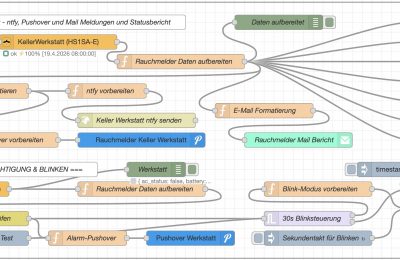
[
{
“id”: “f19c1232b5818c2a”,
“type”: “group”,
“z”: “a906f7d4665bf705”,
“style”: {
“stroke”: “#999999”,
“stroke-opacity”: “1”,
“fill”: “none”,
“fill-opacity”: “1”,
“label”: true,
“label-position”: “nw”,
“color”: “#a4a4a4”
},
“nodes”: [
“a6ea58dab388b29c”,
“765bf0769705a2ff”,
“g7h8i9j0k1l2m3n4”,
“i9j0k1l2m3n4o5p6”,
“fac5633b6eba8601”,
“7a1904f924795633”,
“1fc2a6b8f60b088d”,
“f8b1b27956f09b3e”,
“147944ef03bfde4c”,
“4ab2f6e25855efce”,
“9d6eebcf795ee86e”,
“ac1607f8f0db6b5d”,
“24495c060d2a8756”,
“2bb5b7ad91154a04”,
“06fda76032ceaefb”,
“296a847a7c85c981”,
“3deb8b862d1238e4”,
“acbb6ccfa4615f05”,
“2cf42ba58b153108”,
“0f916dab840c7276”,
“fd8f8ffdf77a106c”,
“0469b6708a6631f2”,
“e45e871a10a710b2”,
“95efe3c5faf4ab5b”,
“6f243fcb4da873d4”,
“b69dfaa826fb2d91”,
“685b6cb6ac3300e8”,
“efd4d502334fbc36”,
“6247c2a58286fc73”,
“ab3764d33b337c6f”,
“0f3d4c079b703181”,
“cb8dcc5798bb85a4”,
“551b4d13bc9b505f”,
“191ef45fc6c07a97”,
“d4e9451a20607f2f”
],
“x”: 34,
“y”: 19,
“w”: 1312,
“h”: 522
},
{
“id”: “a6ea58dab388b29c”,
“type”: “zigbee2mqtt-get”,
“z”: “a906f7d4665bf705”,
“g”: “f19c1232b5818c2a”,
“name”: “”,
“server”: “1bfcccb11dd30d19”,
“friendly_name”: “KellerWerkstatt (HS1SA-E)”,
“device_id”: “0xf84477fffe123ed0”,
“state”: “0”,
“enableMultiple”: false,
“x”: 400,
“y”: 100,
“wires”: [
[
“06fda76032ceaefb”
]
]
},
{
“id”: “765bf0769705a2ff”,
“type”: “inject”,
“z”: “a906f7d4665bf705”,
“g”: “f19c1232b5818c2a”,
“name”: “8:00 Tag”,
“props”: [
{
“p”: “topic”,
“vt”: “str”
}
],
“repeat”: “”,
“crontab”: “00 08 * * *”,
“once”: false,
“onceDelay”: 0.1,
“topic”: “”,
“x”: 140,
“y”: 140,
“wires”: [
[
“a6ea58dab388b29c”
]
]
},
{
“id”: “g7h8i9j0k1l2m3n4”,
“type”: “function”,
“z”: “a906f7d4665bf705”,
“g”: “f19c1232b5818c2a”,
“name”: “E-Mail Formatierung”,
“func”: “let data = msg.payload;\n\n// E-Mail Inhalt erstellen\nlet emailContent = `\n<h2>🏠 🚨 Rauchmelder Statusbericht</h2>\n<p><strong>Gerät:</strong> ${data.friendly_name}</p>\n<p><strong>Datum/Uhrzeit:</strong> ${new Date(data.timestamp).toLocaleString(‘de-DE’)}</p>\n<hr>\n<h3>Status:</h3>\n<table border=\”1\” cellpadding=\”5\” cellspacing=\”0\” style=\”border-collapse: collapse;\”>\n <tr>\n <td><strong>Batteriestatus:</strong></td>\n <td>${data.battery}%</td>\n </tr>\n <tr>\n <td><strong>Batterie OK:</strong></td>\n <td>${data.battery_ok ? ‘✅ Ja’ : ‘❌ Nein – Bitte wechseln!’}</td>\n </tr>\n <tr>\n <td><strong>Test-Modus:</strong></td>\n <td>${data.test_mode ? ‘🔴 Aktiv’ : ‘⚪ Inaktiv’}</td>\n </tr>\n <tr>\n <td><strong>Rauchmelder:</strong></td>\n <td>${data.smoke ? ‘🚨 ALARM’ : ‘✅ Normal’}</td>\n </tr>\n <tr>\n <td><strong>Signalstärke:</strong></td>\n <td>${data.linkquality} LQI</td>\n </tr>\n</table>\n\n<p><em>Automatisierte Statusmeldung ZigBee Rauchmelder ${data.friendly_name}.</em></p>\n`;\n\n// Warnung bei niedrigem Batteriestand\nif (!data.battery_ok) {\n emailContent = emailContent.replace(‘<h2>’, ‘<h2 style=\”color: red;\”>⚠️ WARNUNG – ‘);\n emailContent += ‘<p style=\”color: red; font-weight: bold;\”>⚠️ Der Batteriestand ist niedrig! Bitte tauschen Sie die Batterie aus.</p>’;\n}\n\nmsg.payload = emailContent;\nmsg.topic = `Rauchmelder ${data.friendly_name} Statusbericht`;\n\nreturn msg;”,
“outputs”: 1,
“timeout”: “”,
“noerr”: 0,
“initialize”: “”,
“finalize”: “”,
“libs”: [],
“x”: 820,
“y”: 240,
“wires”: [
[
“fac5633b6eba8601”
]
]
},
{
“id”: “i9j0k1l2m3n4o5p6”,
“type”: “inject”,
“z”: “a906f7d4665bf705”,
“g”: “f19c1232b5818c2a”,
“name”: “Manueller Test”,
“props”: [
{
“p”: “payload”
},
{
“p”: “topic”,
“vt”: “str”
}
],
“repeat”: “”,
“crontab”: “”,
“once”: false,
“onceDelay”: 0.1,
“topic”: “”,
“payload”: “”,
“payloadType”: “date”,
“x”: 160,
“y”: 100,
“wires”: [
[
“a6ea58dab388b29c”
]
]
},
{
“id”: “fac5633b6eba8601”,
“type”: “e-mail”,
“z”: “a906f7d4665bf705”,
“g”: “f19c1232b5818c2a”,
“server”: “smtp.mail.de”,
“port”: “465”,
“secure”: true,
“tls”: true,
“name”: “rauchmelder@domain.com”,
“dname”: “Rauchmelder Mail Bericht”,
“output”: false,
“outputs”: 0,
“x”: 890,
“y”: 300,
“wires”: []
},
{
“id”: “7a1904f924795633”,
“type”: “debug”,
“z”: “a906f7d4665bf705”,
“g”: “f19c1232b5818c2a”,
“name”: “Daten aufbereitet”,
“active”: true,
“tosidebar”: true,
“console”: false,
“tostatus”: false,
“complete”: “payload”,
“targetType”: “msg”,
“statusVal”: “”,
“statusType”: “auto”,
“x”: 850,
“y”: 60,
“wires”: []
},
{
“id”: “1fc2a6b8f60b088d”,
“type”: “ui-gauge”,
“z”: “a906f7d4665bf705”,
“g”: “f19c1232b5818c2a”,
“name”: “Rauchmelder Batterie”,
“group”: “5673b51cc6b259c0”,
“order”: 1,
“value”: “payload.battery”,
“valueType”: “msg”,
“width”: 3,
“height”: 3,
“gtype”: “gauge-half”,
“gstyle”: “needle”,
“title”: “Batterie”,
“alwaysShowTitle”: false,
“units”: “%”,
“icon”: “”,
“prefix”: “”,
“suffix”: “”,
“segments”: [
{
“from”: “0”,
“color”: “#ff2600”,
“text”: “”,
“textType”: “label”
},
{
“from”: “40”,
“color”: “#ffc800”,
“text”: “”,
“textType”: “label”
},
{
“from”: “100”,
“color”: “#4e8f00”,
“text”: “”,
“textType”: “label”
}
],
“min”: 0,
“max”: 100,
“sizeThickness”: 16,
“sizeGap”: 4,
“sizeKeyThickness”: 8,
“styleRounded”: true,
“styleGlow”: false,
“className”: “”,
“x”: 1220,
“y”: 60,
“wires”: [
[]
]
},
{
“id”: “f8b1b27956f09b3e”,
“type”: “ui-text”,
“z”: “a906f7d4665bf705”,
“g”: “f19c1232b5818c2a”,
“group”: “5673b51cc6b259c0”,
“order”: 7,
“width”: “3”,
“height”: 1,
“name”: “Batterie Anzeige”,
“label”: “Batteriestatus”,
“format”: “{{msg.payload.battery}}%”,
“layout”: “row-spread”,
“style”: false,
“font”: “”,
“fontSize”: “”,
“color”: “#000000”,
“wrapText”: false,
“className”: “”,
“value”: “payload.battery”,
“valueType”: “msg”,
“x”: 1200,
“y”: 100,
“wires”: []
},
{
“id”: “147944ef03bfde4c”,
“type”: “ui-text”,
“z”: “a906f7d4665bf705”,
“g”: “f19c1232b5818c2a”,
“group”: “5673b51cc6b259c0”,
“order”: 6,
“width”: “3”,
“height”: 1,
“name”: “Batterie OK Status”,
“label”: “Batterie OK”,
“format”: “{{msg.payload.battery_ok ? ‘✅ Ja’ : ‘❌ Nein’}}”,
“layout”: “row-spread”,
“style”: false,
“font”: “”,
“fontSize”: “”,
“color”: “#000000”,
“wrapText”: false,
“className”: “”,
“value”: “payload.battery_ok”,
“valueType”: “msg”,
“x”: 1210,
“y”: 140,
“wires”: []
},
{
“id”: “4ab2f6e25855efce”,
“type”: “ui-text”,
“z”: “a906f7d4665bf705”,
“g”: “f19c1232b5818c2a”,
“group”: “5673b51cc6b259c0”,
“order”: 5,
“width”: “3”,
“height”: 1,
“name”: “Test Modus”,
“label”: “Test-Modus”,
“format”: “{{msg.payload.test_mode ? ‘🔴 Aktiv’ : ‘⚪ Inaktiv’}}”,
“layout”: “row-spread”,
“style”: false,
“font”: “”,
“fontSize”: “”,
“color”: “#000000”,
“wrapText”: false,
“className”: “”,
“value”: “payload.test_mode”,
“valueType”: “msg”,
“x”: 1190,
“y”: 180,
“wires”: []
},
{
“id”: “9d6eebcf795ee86e”,
“type”: “ui-text”,
“z”: “a906f7d4665bf705”,
“g”: “f19c1232b5818c2a”,
“group”: “5673b51cc6b259c0”,
“order”: 4,
“width”: “3”,
“height”: 1,
“name”: “Rauch Status”,
“label”: “Rauchmelder”,
“format”: “{{msg.payload.smoke ? ‘🚨 ALARM’ : ‘✅ Normal’}}”,
“layout”: “row-spread”,
“style”: false,
“font”: “”,
“fontSize”: “”,
“color”: “#000000”,
“wrapText”: false,
“className”: “”,
“value”: “payload.smoke”,
“valueType”: “msg”,
“x”: 1200,
“y”: 220,
“wires”: []
},
{
“id”: “ac1607f8f0db6b5d”,
“type”: “ui-text”,
“z”: “a906f7d4665bf705”,
“g”: “f19c1232b5818c2a”,
“group”: “5673b51cc6b259c0”,
“order”: 3,
“width”: “3”,
“height”: 1,
“name”: “Signalstärke”,
“label”: “Signalstärke”,
“format”: “{{msg.payload.linkquality}} LQI”,
“layout”: “row-spread”,
“style”: false,
“font”: “”,
“fontSize”: “”,
“color”: “#000000”,
“wrapText”: false,
“className”: “”,
“value”: “payload.linkquality”,
“valueType”: “msg”,
“x”: 1190,
“y”: 260,
“wires”: []
},
{
“id”: “24495c060d2a8756”,
“type”: “ui-text”,
“z”: “a906f7d4665bf705”,
“g”: “f19c1232b5818c2a”,
“group”: “5673b51cc6b259c0”,
“order”: 2,
“width”: “3”,
“height”: 1,
“name”: “Letztes Update”,
“label”: “Letztes Update”,
“format”: “{{msg.payload.timestamp | date:’DD.MM.YYYY HH:mm:ss’}}”,
“layout”: “row-spread”,
“style”: false,
“font”: “”,
“fontSize”: “”,
“color”: “#000000”,
“wrapText”: false,
“className”: “”,
“value”: “payload.timestamp_formatted”,
“valueType”: “msg”,
“x”: 1200,
“y”: 300,
“wires”: []
},
{
“id”: “2bb5b7ad91154a04”,
“type”: “comment”,
“z”: “a906f7d4665bf705”,
“g”: “f19c1232b5818c2a”,
“name”: “Rauchmelder Keller Werkstatt – ntfy, Pushover und Mail Meldungen und Statusbericht”,
“info”: “”,
“x”: 360,
“y”: 60,
“wires”: []
},
{
“id”: “06fda76032ceaefb”,
“type”: “function”,
“z”: “a906f7d4665bf705”,
“g”: “f19c1232b5818c2a”,
“name”: “Rauchmelder Daten aufbereiten”,
“func”: “// ZigBee2MQTT Daten parsen\nlet data = msg.payload;\nlet deviceInfo = {};\n\n// Prüfen ob Daten vorhanden sind\nif (typeof data === ‘object’) {\n // Batteriestatus (in % oder Spannung)\n deviceInfo.battery = data.battery || data.battery_percentage || 0;\n deviceInfo.battery_low = data.battery_low || false;\n \n // Test-Modus (falls vorhanden)\n deviceInfo.test_mode = data.test_mode || false;\n \n // Rauchmelder Status (Alarm, Normal, etc.)\n deviceInfo.smoke = data.smoke || false;\n deviceInfo.smoke_detected = data.smoke_detected || false;\n \n // Zusätzliche Status-Felder für HS1SA-E\n deviceInfo.trouble = data.trouble || false;\n deviceInfo.tamper = data.tamper || false;\n \n // Link Quality\n deviceInfo.linkquality = data.linkquality || 0;\n \n // Last seen aus ZigBee2MQTT\n deviceInfo.last_seen = data.last_seen || new Date().toISOString();\n \n // Batterie OK Status berechnen\n deviceInfo.battery_ok = true;\n if (deviceInfo.battery_low === true || \n (typeof deviceInfo.battery === ‘number’ && deviceInfo.battery < 20)) {\n deviceInfo.battery_ok = false;\n }\n \n // Timestamp für die aktuelle Abfrage\n deviceInfo.timestamp = new Date().toISOString();\n deviceInfo.timestamp_formatted = new Date().toLocaleString(‘de-DE’);\n \n deviceInfo.friendly_name = \”KellerWerkstatt\”;\n \n msg.payload = deviceInfo;\n \n return msg;\n}\n\nreturn msg;”,
“outputs”: 1,
“timeout”: 0,
“noerr”: 0,
“initialize”: “”,
“finalize”: “”,
“libs”: [],
“x”: 650,
“y”: 140,
“wires”: [
[
“3deb8b862d1238e4”,
“1fc2a6b8f60b088d”,
“f8b1b27956f09b3e”,
“147944ef03bfde4c”,
“4ab2f6e25855efce”,
“9d6eebcf795ee86e”,
“ac1607f8f0db6b5d”,
“24495c060d2a8756”,
“7a1904f924795633”,
“g7h8i9j0k1l2m3n4”
]
]
},
{
“id”: “296a847a7c85c981”,
“type”: “pushover api”,
“z”: “a906f7d4665bf705”,
“g”: “f19c1232b5818c2a”,
“keys”: “13d7f9e6fd4a0fe1”,
“title”: “Rauchmelder Keller Werkstatt”,
“name”: “Rauchmelder Keller Werkstatt”,
“x”: 570,
“y”: 300,
“wires”: []
},
{
“id”: “3deb8b862d1238e4”,
“type”: “function”,
“z”: “a906f7d4665bf705”,
“g”: “f19c1232b5818c2a”,
“name”: “Statusbericht formatieren”,
“func”: “// Statusbericht formatieren\nconst data = msg.payload;\nconst friendlyName = data.friendly_name || \”Rauchmelder Keller Werkstatt\”;\nconst timestamp = new Date().toLocaleString(‘de-DE’, {\n weekday: ‘long’,\n year: ‘numeric’,\n month: ‘2-digit’,\n day: ‘2-digit’,\n hour: ‘2-digit’,\n minute: ‘2-digit’,\n second: ‘2-digit’\n});\n\n// Batteriestatus\nlet batteryEmoji = \”🔋\”;\nlet batteryStatus = \”\”;\nif (data.battery <= 20) {\n batteryEmoji = \”⚠️🔴\”;\n batteryStatus = \”KRITISCH – SOFORT WECHSELN!\”;\n} else if (data.battery <= 50) {\n batteryEmoji = \”⚠️🟡\”;\n batteryStatus = \”Bald wechseln\”;\n} else if (data.battery <= 80) {\n batteryEmoji = \”🟢\”;\n batteryStatus = \”Gut\”;\n} else {\n batteryEmoji = \”💚\”;\n batteryStatus = \”Sehr gut\”;\n}\n\n// Geräte-Status\nlet deviceStatus = \”✅ OK\”;\nif (data.battery_low) deviceStatus = \”⚠️ Batterie schwach\”;\nif (data.trouble) deviceStatus = \”🔴 Störung\”;\nif (data.tamper) deviceStatus = \”🔧 Manipulation\”;\nif (data.smoke) deviceStatus = \”🚨 RAUCHALARM!\”;\n\n// Linkqualität (LQI: 0-255)\nlet linkQualityText = \”🔴 Schlecht\”;\nif (data.linkquality >= 200) linkQualityText = \”🟢 Sehr gut\”;\nelse if (data.linkquality >= 150) linkQualityText = \”🟢 Gut\”;\nelse if (data.linkquality >= 100) linkQualityText = \”🟡 Mittel\”;\nelse if (data.linkquality >= 50) linkQualityText = \”🟠 Schwach\”;\n\n// Last seen formatieren\nlet lastSeenStr = \”Unbekannt\”;\nif (data.last_seen) {\n try {\n lastSeenStr = new Date(data.last_seen).toLocaleString(‘de-DE’);\n } catch (e) {\n lastSeenStr = data.last_seen;\n }\n}\n\n// Statusbericht\nconst reportTitle = `Statusbericht – Rauchmelder`; // Ohne Emoji für Header\nconst reportMessage = \n `📋 ${reportTitle}\\n` +\n `Gerät: ${friendlyName}\\n` +\n `${batteryEmoji} Batterie: ${data.battery}% – ${batteryStatus}\\n` +\n `📶 Signal: ${linkQualityText} (${data.linkquality} LQI)\\n` +\n `🔄 Gerätestatus: ${deviceStatus}\\n` +\n `🕒 Letzter Kontakt: ${lastSeenStr}\\n` +\n `📊 Bericht erstellt: ${timestamp}\\n\\n` +\n `Letzte Werte:\\n` +\n `• Rauch gemeldet: ${data.smoke ? ‘Ja 🚨’ : ‘Nein ✅’}\\n` +\n `• Batterie schwach: ${data.battery_low ? ‘Ja ⚠️’ : ‘Nein ✅’}\\n` +\n `• Manipulation: ${data.tamper ? ‘Ja 🔧’ : ‘Nein ✅’}\\n` +\n `• Störung: ${data.trouble ? ‘Ja 🔴’ : ‘Nein ✅’}\\n` +\n `• Test-Modus: ${data.test_mode ? ‘Ja 🔧’ : ‘Nein ✅’}\\n\\n`;\n\n// Für Pushover\nmsg.pushover = {\n // url: \”https://ntfy.sh/secret-theme-Rauchmelder\”,\n // method: \”POST\”,\n headers: {\n \”Title\”: reportTitle.replace(/[^a-zA-Z0-9\\s-]/g, ”), // Entfernt alle Sonderzeichen\n \”Tags\”: data.battery <= 20 ? \”warning,rotating_light,battery\” : \”battery,rotating_light\”,\n \”Priority\”: data.battery <= 20 ? \”high\” : \”default\”\n },\n payload: reportMessage\n};\n\n// Für ntfy – Header müssen ASCII-konform sein (keine Umlaute oder Emojis)\nmsg.ntfy = {\n url: \”https://ntfy.sh/secret-theme-Rauchmelder\”,\n method: \”POST\”,\n headers: {\n \”Title\”: reportTitle.replace(/[^a-zA-Z0-9\\s-]/g, ”), // Entfernt alle Sonderzeichen\n \”Tags\”: data.battery <= 20 ? \”warning,rotating_light,battery\” : \”battery,rotating_light\”,\n \”Priority\”: data.battery <= 20 ? \”high\” : \”default\”\n },\n payload: reportMessage\n};\n\n// Kennzeichnung für Debug\nmsg.is_battery_report = true;\n\nreturn msg;”,
“outputs”: 1,
“timeout”: 0,
“noerr”: 0,
“initialize”: “”,
“finalize”: “”,
“libs”: [],
“x”: 230,
“y”: 200,
“wires”: [
[
“acbb6ccfa4615f05”,
“0f916dab840c7276”
]
]
},
{
“id”: “acbb6ccfa4615f05”,
“type”: “function”,
“z”: “a906f7d4665bf705”,
“g”: “f19c1232b5818c2a”,
“name”: “ntfy vorbereiten”,
“func”: “// ntfy Request vorbereiten\nconst ntfyConfig = msg.ntfy;\n\n// HTTP Request für ntfy erstellen\nmsg.url = ntfyConfig.url;\nmsg.method = ntfyConfig.method;\nmsg.headers = ntfyConfig.headers;\nmsg.payload = ntfyConfig.payload;\n\n// Debug-Ausgabe (optional, kann später entfernt werden)\nnode.warn(\”ntfy Header: \” + JSON.stringify(msg.headers));\n\nreturn msg;”,
“outputs”: 1,
“timeout”: 0,
“noerr”: 0,
“initialize”: “”,
“finalize”: “”,
“libs”: [],
“x”: 500,
“y”: 200,
“wires”: [
[
“2cf42ba58b153108”
]
]
},
{
“id”: “2cf42ba58b153108”,
“type”: “http request”,
“z”: “a906f7d4665bf705”,
“g”: “f19c1232b5818c2a”,
“name”: “Keller Werkstatt ntfy senden”,
“method”: “use”,
“ret”: “txt”,
“paytoqs”: “ignore”,
“url”: “”,
“tls”: “”,
“persist”: false,
“proxy”: “”,
“insecureHTTPParser”: false,
“authType”: “”,
“senderr”: false,
“headers”: [],
“x”: 560,
“y”: 260,
“wires”: [
[]
]
},
{
“id”: “0f916dab840c7276”,
“type”: “function”,
“z”: “a906f7d4665bf705”,
“g”: “f19c1232b5818c2a”,
“name”: “Pushover vorbereiten”,
“func”: “// Pushover Request vorbereiten\nconst pushoverConfig = msg.pushover;\n\n// HTTP Request für Pushover erstellen\nmsg.headers = pushoverConfig.headers;\nmsg.payload = pushoverConfig.payload;\n\nreturn msg;”,
“outputs”: 1,
“timeout”: 0,
“noerr”: 0,
“initialize”: “”,
“finalize”: “”,
“libs”: [],
“x”: 300,
“y”: 300,
“wires”: [
[
“296a847a7c85c981”
]
]
},
{
“id”: “fd8f8ffdf77a106c”,
“type”: “function”,
“z”: “a906f7d4665bf705”,
“g”: “f19c1232b5818c2a”,
“name”: “Rauchmelder Daten aufbereiten”,
“func”: “// ZigBee2MQTT Daten parsen\nlet data = msg.payload;\nlet deviceInfo = {};\nlet alarmStatus = false;\n\n// Prüfen ob Daten vorhanden sind\nif (typeof data === ‘object’) {\n // Batteriestatus (in % oder Spannung)\n deviceInfo.battery = data.battery || data.battery_percentage || 0;\n deviceInfo.battery_low = data.battery_low || false;\n \n // Test-Modus (falls vorhanden)\n deviceInfo.test_mode = data.test || false; // Wichtig: heißt ‘test’ im HS1SA-E\n \n // Rauchmelder Status (Alarm!)\n deviceInfo.smoke = data.smoke || false;\n alarmStatus = deviceInfo.smoke; // Für Alarmerkennung\n \n // Link Quality\n deviceInfo.linkquality = data.linkquality || 0;\n \n // Last seen aus ZigBee2MQTT\n deviceInfo.last_seen = data.last_seen || new Date().toISOString();\n \n // Batterie OK Status berechnen\n deviceInfo.battery_ok = true;\n if (deviceInfo.battery_low === true || \n (typeof deviceInfo.battery === ‘number’ && deviceInfo.battery < 20)) {\n deviceInfo.battery_ok = false;\n }\n \n // Timestamp für die aktuelle Abfrage\n deviceInfo.timestamp = new Date().toISOString();\n deviceInfo.timestamp_formatted = new Date().toLocaleString(‘de-DE’);\n deviceInfo.friendly_name = \”Keller Werkstatt\”;\n \n // Alarm-Status für nachfolgende Nodes\n msg.payload = deviceInfo;\n msg.alarm_active = alarmStatus; // Explizites Flag für Alarm\n msg.alarm_triggered = alarmStatus; // Alternative Bezeichnung\n \n return msg;\n}\n\nreturn msg;”,
“outputs”: 1,
“timeout”: 0,
“noerr”: 0,
“initialize”: “”,
“finalize”: “”,
“libs”: [],
“x”: 570,
“y”: 400,
“wires”: [
[
“0469b6708a6631f2”
]
]
},
{
“id”: “0469b6708a6631f2”,
“type”: “switch”,
“z”: “a906f7d4665bf705”,
“g”: “f19c1232b5818c2a”,
“name”: “Alarm-Status prüfen”,
“property”: “alarm_active”,
“propertyType”: “msg”,
“rules”: [
{
“t”: “true”
}
],
“checkall”: “true”,
“repair”: false,
“outputs”: 1,
“x”: 240,
“y”: 460,
“wires”: [
[
“e45e871a10a710b2”,
“685b6cb6ac3300e8”
]
]
},
{
“id”: “e45e871a10a710b2”,
“type”: “trigger”,
“z”: “a906f7d4665bf705”,
“g”: “f19c1232b5818c2a”,
“name”: “30s Blinksteuerung”,
“op1”: “start”,
“op2”: “stop”,
“op1type”: “str”,
“op2type”: “str”,
“duration”: “30”,
“extend”: false,
“overrideDelay”: false,
“units”: “s”,
“reset”: “”,
“bytopic”: “all”,
“topic”: “topic”,
“outputs”: 2,
“x”: 910,
“y”: 460,
“wires”: [
[
“95efe3c5faf4ab5b”
],
[
“b69dfaa826fb2d91”
]
]
},
{
“id”: “95efe3c5faf4ab5b”,
“type”: “function”,
“z”: “a906f7d4665bf705”,
“g”: “f19c1232b5818c2a”,
“name”: “Blink-Modus vorbereiten”,
“func”: “// Blink-Modus für die Kerzenbirne\n// Sekundentakt: 1s an, 1s aus\n\n// Aktuellen Zustand der Birne abfragen und speichern\n// Dazu müssten Sie den aktuellen Status kennen – hier als Platzhalter\nflow.set(\”light_previous_state\”, {\n state: \”ON\”, // Hier müsste der echte Status ermittelt werden\n brightness: 254\n});\n\n// Blinken aktivieren\nflow.set(\”blink_active\”, true);\nflow.set(\”blink_counter\”, 0);\nflow.set(\”blink_state\”, \”OFF\”); // Startet mit OFF, dann wechselt zu ON\n\n// Ersten Befehl senden (Licht an in Rot)\nmsg.topic = \”zigbee2mqtt/KerzenbirneBuero/set\”;\nmsg.payload = {\n \”state\”: \”ON\”,\n \”brightness\”: 254,\n \”color\”: { \”hex\”: \”#FF0000\” }\n};\n\nnode.warn(\”Alarm-Blinken gestartet\”);\n\nreturn msg;”,
“outputs”: 1,
“timeout”: 0,
“noerr”: 0,
“initialize”: “”,
“finalize”: “”,
“libs”: [],
“x”: 930,
“y”: 400,
“wires”: [
[
“6f243fcb4da873d4”
]
]
},
{
“id”: “6f243fcb4da873d4”,
“type”: “function”,
“z”: “a906f7d4665bf705”,
“g”: “f19c1232b5818c2a”,
“name”: “Toggle-Blinken”,
“func”: “// Diese Funktion erzeugt den Sekundentakt\n// Sie wird von einem Inject-Node im Sekundentakt aufgerufen\n\n// Aktuellen Zustand aus Flow-Kontext holen\nlet currentState = flow.get(\”blink_state\”) || \”OFF\”;\nlet counter = flow.get(\”blink_counter\”) || 0;\nlet blinkActive = flow.get(\”blink_active\”) || false;\n\n// Prüfen ob Blinken aktiv ist (vom Trigger gesetzt)\nif (!blinkActive) {\n // Wenn nicht aktiv, nichts tun\n return null;\n}\n\n// Zustand umschalten\nlet newState = (currentState === \”ON\”) ? \”OFF\” : \”ON\”;\nflow.set(\”blink_state\”, newState);\n\n// Zähler erhöhen\ncounter++;\nflow.set(\”blink_counter\”, counter);\n\n// Nach 30 Sekunden automatisch beenden (30 Toggles = 30 Sekunden bei 1s Intervall)\nif (counter >= 30) {\n // Blinken beenden\n flow.set(\”blink_counter\”, 0);\n flow.set(\”blink_state\”, \”OFF\”);\n flow.set(\”blink_active\”, false);\n\n // Vorherigen Zustand wiederherstellen\n let previousState = flow.get(\”light_previous_state\”) || { state: \”OFF\” };\n\n msg.topic = \”zigbee2mqtt/KerzenbirneBuero/set\”;\n msg.payload = {\n \”state\”: previousState.state || \”OFF\”\n };\n\n node.warn(\”Alarm-Blinken nach 30s beendet\”);\n return msg;\n}\n\n// Befehl für die Kerzenbirne\nmsg.topic = \”zigbee2mqtt/KerzenbirneBuero/set\”;\nif (newState === \”ON\”) {\n msg.payload = {\n \”state\”: \”ON\”,\n \”brightness\”: 254,\n \”color\”: { \”hex\”: \”#FF0000\” } // Rot\n };\n} else {\n msg.payload = {\n \”state\”: \”OFF\”\n };\n}\n\nreturn msg;”,
“outputs”: 1,
“timeout”: 0,
“noerr”: 0,
“initialize”: “”,
“finalize”: “”,
“libs”: [],
“x”: 1200,
“y”: 440,
“wires”: [
[
“191ef45fc6c07a97”
]
]
},
{
“id”: “b69dfaa826fb2d91”,
“type”: “function”,
“z”: “a906f7d4665bf705”,
“g”: “f19c1232b5818c2a”,
“name”: “Blinken beenden”,
“func”: “// Blinken stoppen\nflow.set(\”blink_active\”, false);\nflow.set(\”blink_counter\”, 0);\nflow.set(\”blink_state\”, \”OFF\”);\n\n// Vorherigen Zustand wiederherstellen\nlet previousState = flow.get(\”light_previous_state\”) || { state: \”OFF\” };\n\nmsg.topic = \”zigbee2mqtt/KerzenbirneBuero/set\”;\nmsg.payload = {\n \”state\”: previousState.state || \”OFF\”\n};\n\nnode.warn(\”Alarm-Blinken gestoppt\”);\n\nreturn msg;”,
“outputs”: 1,
“timeout”: 0,
“noerr”: 0,
“initialize”: “”,
“finalize”: “”,
“libs”: [],
“x”: 1210,
“y”: 400,
“wires”: [
[
“191ef45fc6c07a97”
]
]
},
{
“id”: “685b6cb6ac3300e8”,
“type”: “function”,
“z”: “a906f7d4665bf705”,
“g”: “f19c1232b5818c2a”,
“name”: “Alarm-Pushover”,
“func”: “// Alarm-Benachrichtigung für Pushover\nconst data = msg.payload;\nconst timestamp = new Date().toLocaleString(‘de-DE’, {\n weekday: ‘long’,\n year: ‘numeric’,\n month: ‘2-digit’,\n day: ‘2-digit’,\n hour: ‘2-digit’,\n minute: ‘2-digit’,\n second: ‘2-digit’\n});\n\n// Gerätename ermitteln (mit Fallback)\nconst deviceName = data.friendly_name || ‘Rauchmelder Werkstatt’;\n\n// Alarm-Nachricht formatieren\nlet alarmMessage =\n `🚨 RAUCHALARM! 🚨\n\nGerät: ${deviceName}\nZeit: ${timestamp}\n\n📍 Bereich: ${deviceName}\n⚠️ Es wurde RAUCH detektiert!\n\nBitte überprüfen Sie den Bereich SOFORT!`;\n\n// Pushover-spezifische Felder\nmsg.title = `🚨 RAUCHALARM – ${deviceName}`;\nmsg.payload = alarmMessage;\nmsg.priority = 1; // High Priority\nmsg.sound = \”persistent\”; // Alarmton\nmsg.timestamp = Math.floor(Date.now() / 1000);\n\nreturn msg;”,
“outputs”: 1,
“timeout”: 0,
“noerr”: 0,
“initialize”: “”,
“finalize”: “”,
“libs”: [],
“x”: 460,
“y”: 500,
“wires”: [
[
“6247c2a58286fc73”
]
]
},
{
“id”: “efd4d502334fbc36”,
“type”: “inject”,
“z”: “a906f7d4665bf705”,
“g”: “f19c1232b5818c2a”,
“name”: “Sekundentakt für Blinken”,
“props”: [
{
“p”: “payload”
}
],
“repeat”: “1”,
“crontab”: “”,
“once”: false,
“onceDelay”: 0.1,
“topic”: “”,
“payload”: “”,
“payloadType”: “date”,
“x”: 930,
“y”: 500,
“wires”: [
[
“6f243fcb4da873d4”
]
]
},
{
“id”: “6247c2a58286fc73”,
“type”: “pushover api”,
“z”: “a906f7d4665bf705”,
“g”: “f19c1232b5818c2a”,
“keys”: “13d7f9e6fd4a0fe1”,
“title”: “Rauchmelder Werkstatt Alarm”,
“name”: “Pushover Werkstatt”,
“x”: 670,
“y”: 500,
“wires”: []
},
{
“id”: “ab3764d33b337c6f”,
“type”: “comment”,
“z”: “a906f7d4665bf705”,
“g”: “f19c1232b5818c2a”,
“name”: “=== ALARM-BENACHRICHTIGUNG & BLINKEN ===”,
“info”: “”,
“x”: 280,
“y”: 360,
“wires”: []
},
{
“id”: “0f3d4c079b703181”,
“type”: “zigbee2mqtt-in”,
“z”: “a906f7d4665bf705”,
“g”: “f19c1232b5818c2a”,
“name”: “”,
“server”: “1bfcccb11dd30d19”,
“friendly_name”: “KellerWerkstatt (HS1SA-E)”,
“device_id”: “0xf84477fffe123ed0”,
“state”: “0”,
“outputAtStartup”: true,
“filterChanges”: true,
“enableMultiple”: false,
“x”: 190,
“y”: 400,
“wires”: [
[
“fd8f8ffdf77a106c”,
“d4e9451a20607f2f”
]
]
},
{
“id”: “cb8dcc5798bb85a4”,
“type”: “inject”,
“z”: “a906f7d4665bf705”,
“g”: “f19c1232b5818c2a”,
“name”: “Manueller Test”,
“props”: [
{
“p”: “payload”
},
{
“p”: “topic”,
“vt”: “str”
}
],
“repeat”: “”,
“crontab”: “”,
“once”: false,
“onceDelay”: 0.1,
“topic”: “”,
“payload”: “”,
“payloadType”: “date”,
“x”: 260,
“y”: 500,
“wires”: [
[
“685b6cb6ac3300e8”,
“e45e871a10a710b2”
]
]
},
{
“id”: “551b4d13bc9b505f”,
“type”: “inject”,
“z”: “a906f7d4665bf705”,
“g”: “f19c1232b5818c2a”,
“name”: “”,
“props”: [
{
“p”: “payload”
},
{
“p”: “topic”,
“vt”: “str”
}
],
“repeat”: “”,
“crontab”: “”,
“once”: false,
“onceDelay”: 0.1,
“topic”: “”,
“payload”: “”,
“payloadType”: “date”,
“x”: 1070,
“y”: 360,
“wires”: [
[
“b69dfaa826fb2d91”
]
]
},
{
“id”: “191ef45fc6c07a97”,
“type”: “zigbee2mqtt-out”,
“z”: “a906f7d4665bf705”,
“g”: “f19c1232b5818c2a”,
“name”: “Kerzenbirne”,
“server”: “1bfcccb11dd30d19”,
“friendly_name”: “KerzenbirneBuero (HG07834B/HG09155B/HG08131B)”,
“device_id”: “0x8cf681fffeaf1b37”,
“command”: “state”,
“commandType”: “z2m_cmd”,
“payload”: “payload”,
“payloadType”: “msg”,
“optionsValue”: “”,
“optionsType”: “nothing”,
“x”: 1210,
“y”: 500,
“wires”: []
},
{
“id”: “d4e9451a20607f2f”,
“type”: “debug”,
“z”: “a906f7d4665bf705”,
“g”: “f19c1232b5818c2a”,
“name”: “Werkstatt”,
“active”: true,
“tosidebar”: true,
“console”: false,
“tostatus”: true,
“complete”: “payload”,
“targetType”: “msg”,
“statusVal”: “payload”,
“statusType”: “auto”,
“x”: 600,
“y”: 360,
“wires”: []
},
{
“id”: “1bfcccb11dd30d19”,
“type”: “zigbee2mqtt-server”,
“name”: “Sonoff ZigBee Raspi”,
“host”: “Raspi”,
“mqtt_port”: “1883”,
“mqtt_username”: “raspi”,
“mqtt_password”: “password”,
“mqtt_qos”: “2”,
“tls”: “”,
“usetls”: false,
“base_topic”: “zigbee2mqtt”
},
{
“id”: “5673b51cc6b259c0”,
“type”: “ui-group”,
“name”: “Keller Werkstatt”,
“page”: “5515adb8b2455e2c”,
“width”: “3”,
“height”: 1,
“order”: 2,
“showTitle”: true,
“className”: “”,
“visible”: “true”,
“disabled”: “false”,
“groupType”: “default”
},
{
“id”: “13d7f9e6fd4a0fe1”,
“type”: “pushover-keys”,
“name”: “Rauchmelder Berichte, Warnungen”
},
{
“id”: “5515adb8b2455e2c”,
“type”: “ui-page”,
“name”: “Rauchmelder”,
“ui”: “2e2c9c04099535bf”,
“path”: “/page3”,
“icon”: “smoke”,
“layout”: “grid”,
“theme”: “12f619e2761c4ce7”,
“breakpoints”: [
{
“name”: “Default”,
“px”: “0”,
“cols”: “3”
},
{
“name”: “Tablet”,
“px”: “576”,
“cols”: “6”
},
{
“name”: “Small Desktop”,
“px”: “768”,
“cols”: “9”
},
{
“name”: “Desktop”,
“px”: “1024”,
“cols”: “12”
}
],
“order”: 1,
“className”: “”,
“visible”: “true”,
“disabled”: “false”
},
{
“id”: “2e2c9c04099535bf”,
“type”: “ui-base”,
“name”: “Dashboard @flowuse”,
“path”: “/dashboard”,
“appIcon”: “”,
“includeClientData”: true,
“acceptsClientConfig”: [
“ui-notification”,
“ui-control”
],
“showPathInSidebar”: false,
“headerContent”: “dashboard”,
“navigationStyle”: “default”,
“titleBarStyle”: “default”,
“showReconnectNotification”: true,
“notificationDisplayTime”: 1,
“showDisconnectNotification”: true,
“allowInstall”: false
},
{
“id”: “12f619e2761c4ce7”,
“type”: “ui-theme”,
“name”: “Standardthema”,
“colors”: {
“surface”: “#5734fc”,
“primary”: “#e3b450”,
“bgPage”: “#eeeeee”,
“groupBg”: “#ffffff”,
“groupOutline”: “#cccccc”
},
“sizes”: {
“density”: “default”,
“pagePadding”: “12px”,
“groupGap”: “12px”,
“groupBorderRadius”: “4px”,
“widgetGap”: “12px”
}
},
{
“id”: “c812ee4757f928dd”,
“type”: “global-config”,
“env”: [],
“modules”: {
“node-red-contrib-zigbee2mqtt”: “2.7.5”,
“node-red-node-email-variable”: “1.1.7”,
“@flowfuse/node-red-dashboard”: “1.30.2”,
“node-red-contrib-pushover”: “0.2.0”
}
}
]